

Important announcement about the app
My development environment was infected by unknown malicious software, as a result of which a few builds may have been affected. Once the issue was detected, I secured everything with a full disk wipe, restored a clean setup, and now all builds are scanned with VirusTotal. The F-Droid version will also be verified before release.
Public keys may have been compromised, which is why I am sharing this issue. You can download the new version and the new public key below, and instructions for restoring backups are provided.
No extra actions are required since the app uses
one-time connection codes. These codes have very limited permissions (for example, they cannot change your password). Still, you can revoke them if you want full peace of mind.
How to revoke access:
1. Open
myaccount.google.com/security
2. Find
“Your connections to third-party apps & services”
3. Tap
“See all connection” and locate
YouTube TV or
Google Drive
4. Select the app →
“Remove access”
Please keep built-in security features enabled to stay protected.
SmartTube
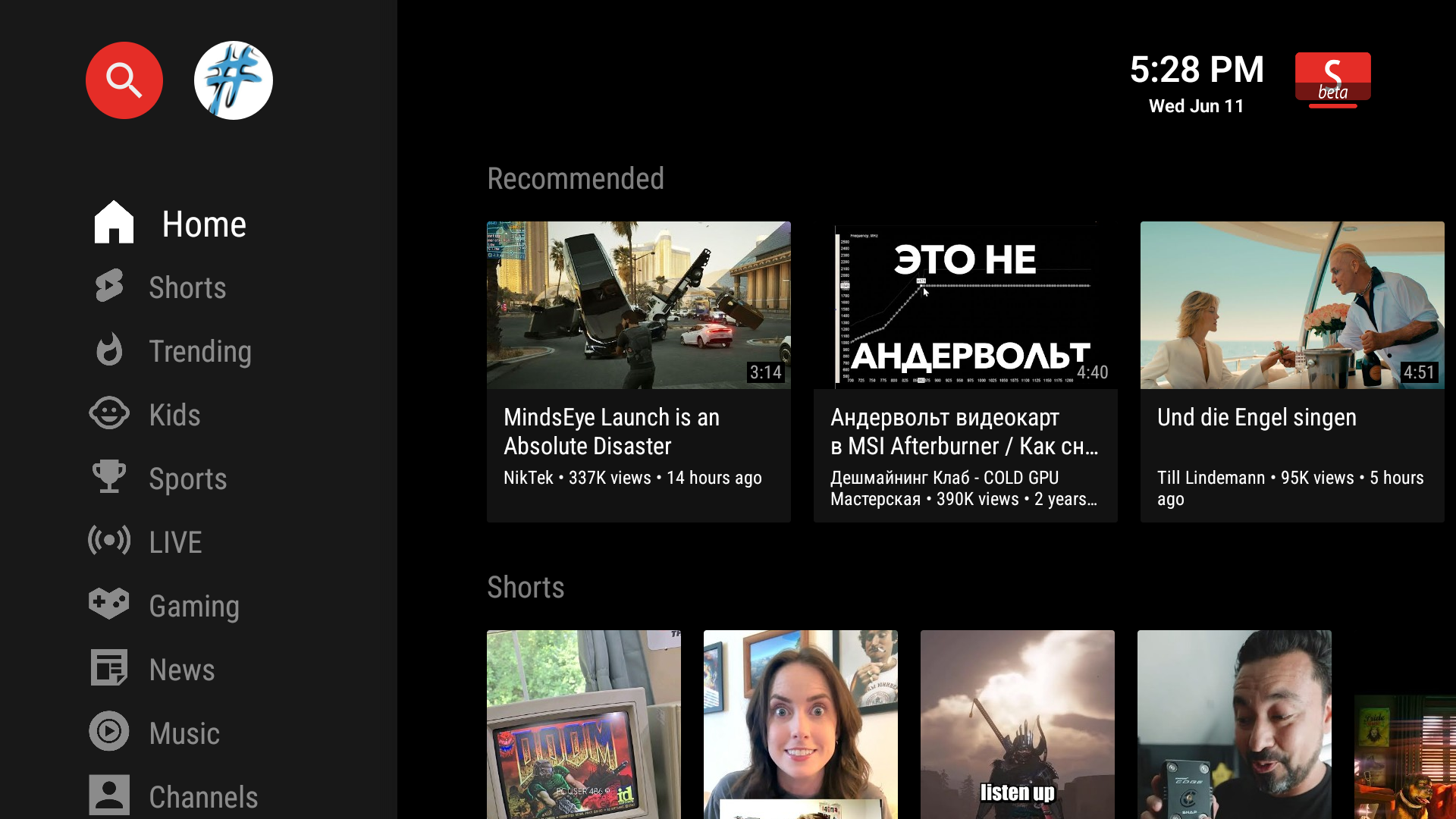
SmartTube is a free and open-source media client for Android TVs and TV boxes. It allows you to browse and play content from various public sources in a TV-optimized interface.
✅ Features
- Clean interface
- SponsorBlock integration
- Adjustable playback speed
- 8K resolution support
- 60fps playback
- HDR compatibility
- View live chat
- Customizable buttons
- Does not require Google Services
- Helpful international community
❌ Limitations
- Not supported on phones and tablets
- Comment functionality is unstable
- Voice search and casting performance may be inferior to official apps, depending on your device
Give it a try!
Do you have any question? Ctrl+F or ⌘F this readme first!
Installation |
Official Site |
Donation |
FAQ |
Support / Chat |
Build |
Translate the app |
Changelog |
Liability
Device support
[!IMPORTANT]
Starting in October 2025 new Amazon FireTV devices no longer run Android under the hood. SmartTube will not be compatible with the Fire Stick 4k Select and newer devices which run Amazon's own VegaOS.
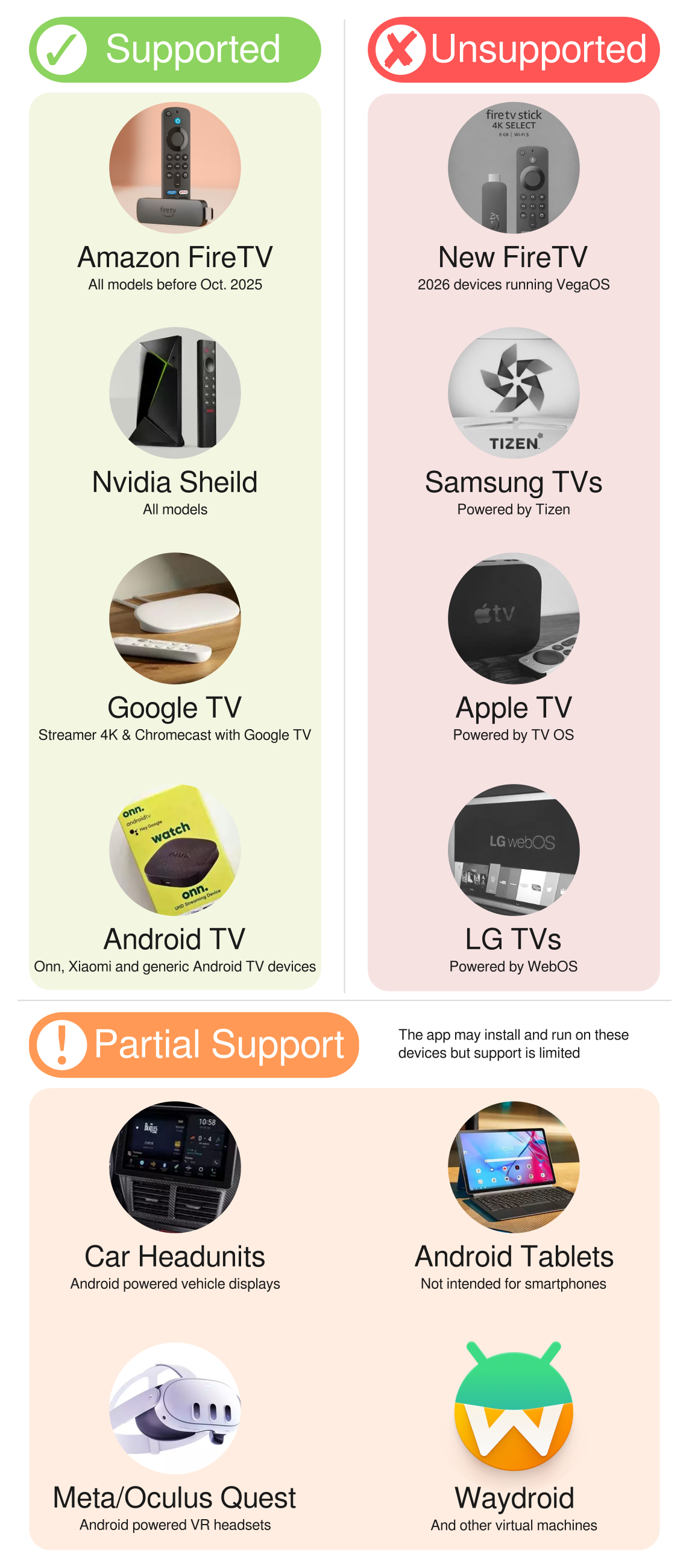
- Supported: all Android TVs and TV boxes (incl. All FireTV devices released before Oct. 2025, NVIDIA Shield & Chromecast with Google TV), even older ones with Android 4.3 (Kitkat).
- Not supported: Smartphones, non-Android platforms like Samsung Tizen, LG webOS, Apple TV, etc.
Installation
video of the installation (note: download url changed to kutt.to/stn_beta or kutt.to/stn_stable)
Do not download SmartTube from any
app store, APK websites or blogs; these were uploaded by other people and may contain malware or ads. SmartTube is not officially published on any app store.
There is a
beta release (recommended) and a
stable release. Beta gets new features and bugfixes faster than the stable release.
You can use either of the following methods to install the app:
- (Easiest) Install Downloader by AFTVnews on your Android TV, open it and enter
kutt.to/stn_beta or kutt.to/stn_stable, then read, understand and confirm the security prompts. (You can also enter 79015 (for beta) or 28544 (for stable), but this requires an extra step to install the AFTVnews Downloader browser addon if you haven't already.)
- Install a file transfer app on your Android TV, download the APK on your phone or computer and transfer it to your TV (e.g. _Send Files to TV_ from the Google Play Store / Amazon AppStore)
- Download the APK onto a USB stick, put the USB stick into your TV and use a file manager app from the Google Play Store / Amazon AppStore (e.g. _FX File Explorer_ or _X-plore_). Android's preinstalled file manager does not work! Do not get the ad-infested _FileCommander_.
- If you are an advanced user, you can install it using ADB. guide | alternative guide
Troubleshooting: See device specific notes below. If installation fails, either your
disk space is full or the APK file didn't download correctly; clear up space and try downloading again. If the app installed, but crashes when opening, make sure to install it to internal memory, not to an SD card / external storage.
The app has a built-in updater with changelog. You can also find all releases and the
changelog on the
Telegram channel @SmartTubeNewsEN (readable without account) or on
Github.
latest beta download
latest stable download
Installation (Chromecast with Google TV)
On
Chromecast with Google TV, installation of apps is blocked by default, so an extra step is required:
4.1. Enable Developer Options
On your Chromecast, open the side menu and go to _Settings > System > About_. Scroll down to the _Android TV OS build_ section and click that repeatedly. A toast message will appear, explaining that you are a few steps away from being a developer. Continue clicking until you trigger it.
4.2. Turn on the "unknown sources" setting
Go back to the main _Settings_ page and select _Apps > Security & Restrictions > Unknown sources_. Turn on the toggle for \[_Downloader by AFTVnews_ or\] whichever file browser you decided to use [...].
[source & picture guide]
After this, you can follow the
general installation guide above.
Installation (Xiaomi devices with Chinese firmware)
Xiaomi's
Chinese firmware might block the installation
of the beta version. The international firmware is not affected. Solutions:
1. Use SmartTube's
stable version instead (
recommended)
2. Use the international firmware for your device
3. (if your device is from 2020 or before) You can do a factory reset and then install SmartTube beta before doing any system updates. You can then safely update your system, SmartTube should continue working.
Updating
The app has a built-in updater. You only need to follow the installation procedure
once. A few seconds after launching SmartTube, it will notify you if there is any update and also show a changelog. You can disable automatic update checks or manually update in the settings under "about".
If the installation fails, either your
disk space is full or the update didn't download correctly; clear up space and try updating again (_Settings > About > Check for updates_).
Compatibility
SmartTube requires Android 4.3 or above. It does not work on non-Android devices (incl. LG or Samsung TVs). On unsupported TVs, you can use a TV stick or TV box. Though this app technically runs on smartphones and tablets, it is not optimized for such and offers no official support!
It has been successfully tested on TVs, TV boxes and TV sticks that are based on Android, including:
- Android TVs & Google TVs (e.g. Philips, Sony)
- Chromecast with Google TV & TVs with _Chromecast built-in_
- Amazon FireTV stick (all generations)
- NVIDIA Shield
- TV boxes running Android (many cheap chinese no-name boxes)
- Xiaomi Mi Box
Features
Interface
SmartTube focuses on a clean and distraction-free interface for watching media content. The app does not include advertising UI elements and focuses on playback and browsing experience instead.
SponsorBlock
SmartTube includes optional SponsorBlock integration. From the
SponsorBlock website:
SponsorBlock is an open-source crowdsourced browser extension and open API for skipping sponsor segments in YouTube videos. [...] the extension automatically skips sponsors it knows about using a privacy preserving query system. It also supports skipping other categories, such as intros, outros and reminders to subscribe [and non-music parts in music videos].
You can select which categories you want to skip in the settings. Unlike the browser addon, in SmartTube you cannot submit new segments (TVs and TV remotes aren't great devices for such precise operations). Note that SponsorBlock is a free and voluntary project based on user submissions, so don't expect it to 100% work every time. Sometimes, sponsor segments are not yet submitted to the database, sometimes the SponsorBlock servers are offline/overloaded.
Casting
To cast videos from your phone (or other devices), you must link that device to your TV. Unlike the original YouTube app, SmartTube does not automatically show up when you are in the same wifi network. How to link your smartphone and TV:
1. open SmartTube and go to settings
2. go to "Remote control" (2nd option)
3. open your YouTube app on your phone, go to settings > General > watch on TV
4. click on _connect using TV-code_ and enter the code from your TV
Screenshot guide
Due to technical limitations, you need to open the app on the TV before casting; SmartTube cannot automatically wake up the TV.
Picture-in-Picture (PiP)
SmartTube supports playing videos in PiP mode. This needs to be enabled under _Settings > General > Background playback > Picture in picture_. The video will go into PiP mode when you press home while playing a video, and also when you press _back_ if enabled in _Settings > General > Background playback (activation)_.
Adjust Speed
You can adjust the playback speed pressing the speed-indicator icon (gauge) in the top row of the player. This is remembered across videos. Some speeds may cause frame drops, this is a known issue.
Voice Search
To enable global voice search, an additional app must be installed alongside SmartTube. This _bridge app_ allows the system voice search to open SmartTube instead of the default YouTube app. For this to work, you must uninstall the original YouTube app. We know this sucks, but you can always reinstall it if you change your mind. The _bridge app_ will not show up in your launcher and you cannot launch it directly; it is only used internally by the system's voice search. On some devices, you need to explicitly say "Youtube" when searching (e.g. say "youtube cute cats" instead of just "cute cats").
On Amazon Fire TV:
1. Uninstall the original YouTube app (no root required)
2. Download and install the Amazon Bridge SmartTube app: https://kutt.to/stn_bridge_amazon (e.g. via _Downloader by AFTVnews_)
On Google Chromecast with Google TV:
1. Uninstall the original YouTube app (no root required)
2. Download and install the ATV Bridge SmartTube app: https://kutt.to/stn_bridge_atv (e.g. via _Downloader by AFTVnews_)
On all other Android devices, sadly root is required to enable this:
1. Root your device (search for a guide for your specific device)
2. Uninstall the official YouTube app using root (
adb shell pm uninstall com.google.android.youtube.tv)
3. Download and install the ATV Bridge SmartTube app: https://kutt.to/stn_bridge_atv (e.g. via _Downloader by AFTVnews_)
Donation
If you want to support my developments you are welcome to buy me a cup of coffee :)
- Patreon (Visa, Mastercard, PayPal)
- PayPal: [email protected]
- BTC: 1JAT5VVWarVBkpVbNDn8UA8HXNdrukuBSx
- LTC: ltc1qgc24eq9jl9cq78qnd5jpqhemkajg9vudwyd8pw
- ETH: 0xe455E21a085ae195a097cd4F456051A9916A5064
- ETC: 0x209eCd33Fa61fA92167595eB3Aea92EE1905c815
- TRX: TJNPY794aSGZf3WGHTna2VCWm2G5Yua7E8
- USDT (TRC20): TJNPY794aSGZf3WGHTna2VCWm2G5Yua7E8
- USDT (BEP20): 0x64B28da787BE6ac5889D276A5638d4f077840eC5
- USDT (ERC20): 0xe455e21a085ae195a097cd4f456051a9916a5064
- TON: UQAc9zgnnzwS8yb5wxAu5CB0RddmjPBjWI-n46oQ7XfCQrgI
- XMR: 48QsMjqfkeW54vkgKyRnjodtYxdmLk6HXfTWPSZoaFPEDpoHDwFUciGCe1QC9VAeGrgGw4PKNAksX9RW7myFqYJQDN5cHGT
Support
Please check the FAQ first! Also at least have a short look at the recent chat history.
You can report in our Telegram group or via
issue tracker on Github (account required).
The international group is in
English only. But don't worry if your English is not perfect, we have a friendly international community.
Team
SmartTube is developed single-handedly; there is no larger team or company behind this. This is an open source, hobby project. Several others have helped with translations, some of which can be seen on
Github, some have sent their translations directly to Yurii. There are also helpful people in the support chat.
Build
NOTE: OpenJDK 14 or older (!) is required. Newer JDK could cause app crash!
To build and install debug version, run these commands:
```
git clone https://github.com/yuliskov/SmartTube.git
cd SmartTube
git submodule update --init
adb connect <device_ip_address>
gradlew clean installStstableDebug
```
Video codecs
Video codecs are the algorithms used for video compression.
Which codec to choose / overview
| | recommendation | hardware support | compression, bitrate\* | quality |
|:--------:|:---------------------------------------------|:---------------------------- |:----------------------:|:-------:|
|
AV01 aka. AV1 | best choice,
if your device supports | first devices started coming in
2020 |
best (e.g. 1.6 Mbps) | same |
|
VP9 |
best choice on most devices | most devices
since 2015 |
better (e.g. 2.1 Mbps) | same |
| AVC | only for old or slow hardware |
all devices | good (e.g. 2.7 Mbps) | same |
\* Examples taken from the video-only track at 1080p @ 25fps for this video:
Dua Lipa - New Rules (Official Music Video)
At the same resolution, a
lower bitrate is better! YouTube explicitly targets the
same quality regardless of the codec. Older codecs have a higher bitrate only because they are less efficient. On Youtube, you
do not get better quality by simply choosing a higher bitrate. Newer codecs have a better compression = lower bitrate = use less bandwidth = save the environment. This is a feature, not a bug. You should use the newest codec that works smoothly on your device, not the least efficient one. AVC usually has the highest bitrate. This is bad, not good.
Which quality to choose?
Currently, there is no automatic mode based on your bandwidth. But you can configure a default video preset yourself under settings \> video player \> video presets. The first option ("none") will remember your last selection within the video player. Any other preset is used initially for each video; if the selected profile is not available, the next best available option is used. You can still override the profile on each video individually within the player.
To decide the optional resolution / video quality for you, you need to consider a few limiting factors:
- Your bandwidth (choose only up to the bitrate that your bandwidth can handle; you can do a speedtest using fast.com by Netflix)
- Your TV's display resolution (the quality might slightly improve, if you select the next higher resolution, e.g. 1080p on a 720p display; but don't expect a big difference)
- Your TV's capabilities (e.g. HDR, 60fps)
Generally 60fps is an improvement, but if you personally don't notice (or mind) the difference, you can save bandwidth (and the environment) by not choosing 60fps.
HDR
HDR works only
if your hardware supports it. It's a complicated mess:
- Your TV must support it
- If you use a TV box, that TV box and your TV cable and the TV must support HDR
- Yes, there truly are different HDMI cable versions with different HDR-support, it's complicated
- some devices (like the NVIDIA Shield) generally support HDR, but not the specific HDR format that is used on YouTube :cry:
If HDR videos look dim or washed out, then check
this article.
If HDR is not working, it's probably not this app's fault. You might need to search on the web for "HDR" and your device name for any help.
Liability
We take no responsibility for the use of our tool, or external instances
provided by third parties. We strongly recommend you abide by the valid
official regulations in your country. Furthermore, we refuse liability
for any inappropriate use of third-party services.
This tool is provided to you in the spirit of free, open software.
You may view the LICENSE in which this software is provided to you
here.
16. Limitation of Liability.
IN NO EVENT UNLESS REQUIRED BY APPLICABLE LAW OR AGREED TO IN WRITING
WILL ANY COPYRIGHT HOLDER, OR ANY OTHER PARTY WHO MODIFIES AND/OR CONVEYS
THE PROGRAM AS PERMITTED ABOVE, BE LIABLE TO YOU FOR DAMAGES, INCLUDING ANY
GENERAL, SPECIAL, INCIDENTAL OR CONSEQUENTIAL DAMAGES ARISING OUT OF THE
USE OR INABILITY TO USE THE PROGRAM (INCLUDING BUT NOT LIMITED TO LOSS OF
DATA OR DATA BEING RENDERED INACCURATE OR LOSSES SUSTAINED BY YOU OR THIRD
PARTIES OR A FAILURE OF THE PROGRAM TO OPERATE WITH ANY OTHER PROGRAMS),
EVEN IF SUCH HOLDER OR OTHER PARTY HAS BEEN ADVISED OF THE POSSIBILITY OF
SUCH DAMAGES.
FAQ
Q: Videos buffer a LOT
A: Try to switch to encrypted DNS like NextDNS. You can set-up such DNS either automatically or manually. To automatic set-up you can use the
Intra apk at fdroid and the
"AutoStart - No root" apk to make it autolaunch after every TV restart. For manual set-up
use this guide.
Q: There is no result for the search that I say (Android 11)
A: They're some reports that the latest update for "Google app for Android TV" could cause this bug. Deleting the update should fix the problem.
Q: AV01 does not play / Why is VP9 slow on my device?
A: Because AV01 is very new,
most TVs and TV boxes
do not offer hardware support and
cannot play AV01
at all.
If your device has hardware support for a codec, videos using that codec should play smoothly. High resolutions might also be slow in VP9 on cheap TV boxes that don't officially support 4k. Your device probably can play VP9 videos even without hardware support, however this requires a powerful CPU to run smoothly. Fixing AV01 without hardware support is technically possible, but currently not planned and probably not efficient enough.
Q: Can you make SmartTube look like the original app?
A: Compared to SmartTube's UI, Stock Youtube and YT Kids are far ahead. However, we'd need someone who's skilled and willing to dedicate enough time and energy into making it. And into maintaining it longterm (incl. new features, bug fixes). All of this for free. If you are / got someone like that, please help.
Not to mention that SmartTube follows Google's official template & recommendations for Android TV apps. It's Google's fault that the template is somewhat ugly. 😂
Q: Can the search page be improved?
A: It can be, but it takes someone to do it, similar to the above FAQ-entry. SmartTube is following Google's officially recommended design/template for TV apps and is using the official, preinstalled Android TV keyboard. Sadly, Google did a really bad job regarding the search page and keyboard. Maybe a future SmartTube update can add an embedded keyboard, similar to the original YouTube or other major Android TV apps. Maybe it can improve the looks to be as good or better than in the official YouTube app. But for now, it is the way it is due to lack of time and due to Google's official recommendations being bad.
Q: Can I install this on a Samsung Tizen TV / LG webOS TV / Roku / iOS / toaster?
A: No, this only works on
Android devices. If you look at an Android TV's product page, it usually says clearly that it's based on Android. The app
cannot easily be ported over to other platforms and we have no plans to even try.
Please do not ask. Instead, you can connect a separate TV stick or TV box to your TV.
Q: Can I install this on a smartphone? / Can you add portrait mode? / Scrolling doesn't work.
A:
Big No. This app is
not for smartphones, we offer
zero support for that.
You
can cast videos
from your smartphone to a TV / TV box running SmartTube, though. Just use the official YouTube app,
Morphe or
ReVanced, see
the casting section for more information.
There will not be a phone version. You can use
Morphe,
ReVanced,
Pure Tuber,
LibreTube,
NewPipe, or
NewPipe x SponsorBlock instead. Please go to their respective support chats for help.
Q: Can I install this on a tablet / car screen / smartphone with docking station?
Yes... maybe.. Requirements:
- It is an Android device
- It has a large screen
- It has a TV remote, controller, or keyboard
Touch input is not supported. Mouse/touchpad scrolling neither. You cannot properly use SmartTube with only touch or mouse input.
Some users reported great success (incl. on a
car entertainment system). **Please share
 →
→
 →
→ →
→ →
→ →
→ →
→