1
 →
→
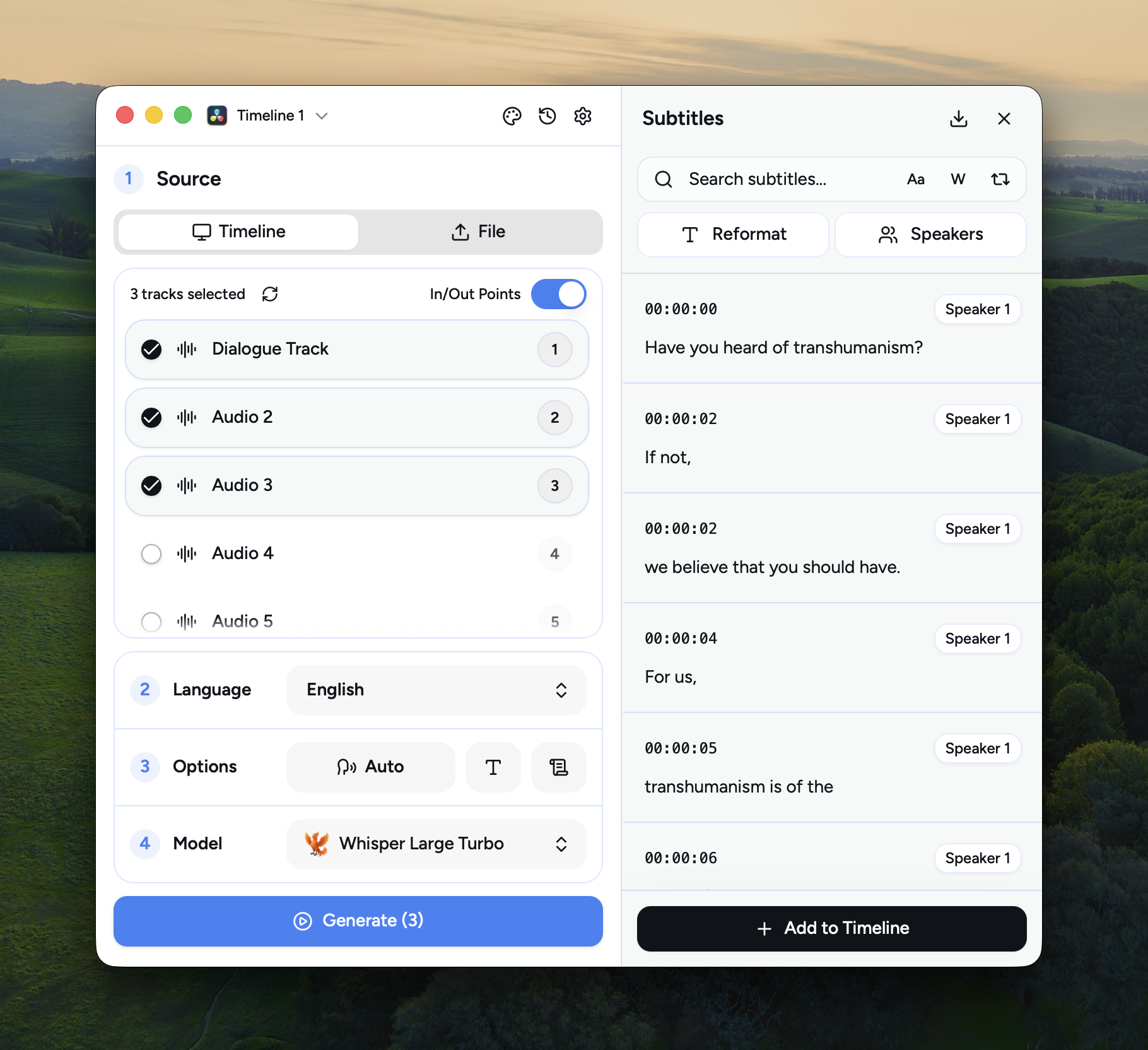
On-device subtitle generation that connects directly to DaVinci Resolve, Premiere, and After Effects.
Local-first AI subtitles. No cloud, no subscription, no data leaving your machine.
Use it as a standalone app, or connect to DaVinci Resolve, Adobe Premiere Pro, and After Effects.


---
| Platform | Installer | |---|---| | 🪟 Windows | AutoSubs-windows-x86_64.exe | | 🍎 macOS (Apple Silicon) | AutoSubs-Mac-ARM.pkg | | 🍎 macOS (Intel) | AutoSubs-Mac-Intel.pkg | | 🐧 Linux (Debian/Ubuntu) | AutoSubs-linux-x86_64.deb | | 🐧 Linux (Fedora/openSUSE) | AutoSubs-linux-x86_64.rpm |
macOS users can also install AutoSubs with Homebrew:
brew install --cask auto-subs
Debian/Ubuntu (.deb):
wget https://github.com/tmoroney/auto-subs/releases/latest/download/AutoSubs-linux-x86_64.deb
sudo apt install ./AutoSubs-linux-x86_64.deb
Fedora/openSUSE (.rpm): Download AutoSubs-linux-x86_64.rpm and open it with your package manager.

---
[!WARNING]
Mac App Store version not supported - download DaVinci Resolve from blackmagicdesign.com instead.
For command-line usage, see the CLI Guide with complete reference, examples, and troubleshooting.
---
[!TIP]
I highly recommend checking out DeepWiki for asking questions and understanding the codebase.
>
---
AutoSubs ships with several local transcription model families. All run fully on-device — nothing is sent to the cloud. Models are downloaded on demand from the in-app Model Manager.
Accuracy is a relative 1–4 rating within AutoSubs (higher is better). Sizes and RAM figures are approximate.
OpenAI's Whisper, via whisper-rs (GGML). Each size is available in a multilingual variant and an .en English-only variant (the .en models are slightly more accurate on English audio).
| Model | Size | RAM | Languages | Accuracy | |---|---|---|---|---| | tiny / tiny.en | 80 MB | 1 GB | Multilingual / English | ★ | | base / base.en | 150 MB | 1 GB | Multilingual / English | ★ | | small / small.en | 480 MB | 2 GB | Multilingual / English | ★★ | | medium / medium.en | 1.5 GB | 5 GB | Multilingual / English | ★★★ | | large-v3-turbo | 1.6 GB | 6 GB | Multilingual | ★★★ | | large-v3 | 3.1 GB | 10 GB | Multilingual | ★★★★ |
Useful Sensors' Moonshine, via ONNX Runtime. The tiny English model is quantized; the language-specific tiny variants and the base model are float-precision.
| Model | Size | RAM | Language | Accuracy | |---|---|---|---|---| | moonshine-tiny | 60 MB | 1 GB | English | ★ | | moonshine-tiny-ar | 120 MB | 1 GB | Arabic | ★★★ | | moonshine-tiny-zh | 120 MB | 1 GB | Chinese | ★★★ | | moonshine-tiny-ja | 120 MB | 1 GB | Japanese | ★★★ | | moonshine-tiny-ko | 120 MB | 1 GB | Korean | ★★★ | | moonshine-tiny-uk | 120 MB | 1 GB | Ukrainian | ★★ | | moonshine-tiny-vi | 120 MB | 1 GB | Vietnamese | ★★★ | | moonshine-base | 200 MB | 1 GB | English | ★★ |
NVIDIA's Parakeet-TDT-0.6B-v3 (int8 ONNX). Fast and accurate, with support for 25 European languages plus Russian and Ukrainian.
| Model | Size | RAM | Languages | Accuracy | |---|---|---|---|---| | parakeet | 700 MB | 2 GB | 25 languages (EU + RU + UK) | ★★★★ |
Alibaba's SenseVoice (int8 ONNX). Compact and well-suited to CJK audio.
| Model | Size | RAM | Languages | Accuracy | |---|---|---|---|---| | sense-voice | 230 MB | 1 GB | Chinese, English, Japanese, Korean, Cantonese | ★★★ |
NVIDIA's Canary-1B-v2 (int8 ONNX). A multilingual encoder-decoder model that also supports native translation.
| Model | Size | RAM | Languages | Accuracy | |---|---|---|---|---| | canary | 1 GB | 3 GB | 25 languages (EU + RU + UK) | ★★★★ |
Cohere Transcribe (int4 ONNX). The highest-accuracy option for a focused set of 14 widely-spoken languages.
| Model | Size | RAM | Languages | Accuracy | |---|---|---|---|---| | cohere | 2 GB | 4 GB | Arabic, German, Greek, English, Spanish, French, Italian, Japanese, Korean, Dutch, Polish, Portuguese, Vietnamese, Chinese | ★★★★ |
Sber's GigaAM v3 (int8 ONNX). A Conformer model trained on 700k hours of Russian speech — the most accurate option for Russian audio. The end-to-end CTC variant outputs punctuated, normalized text.
| Model | Size | RAM | Languages | Accuracy | |---|---|---|---|---| | gigaam-v3 | 225 MB | 2 GB | Russian, English | ★★★★ |
GigaAM Multilingual (600M, int8 ONNX) covers Central Asian languages that the other models handle poorly — Whisper large v3 scores 58–110% WER on Kazakh, Kyrgyz and Uzbek. It uses a character-wise CTC head, so unlike GigaAM v3 its output has no punctuation or capitalization.
| Model | Size | RAM | Languages | Accuracy | |---|---|---|---|---| | gigaam-multilingual | 592 MB | 3 GB | Russian, Kazakh, Kyrgyz, Uzbek, English | ★★★★ |
In addition to transcription models, AutoSubs downloads a speaker diarization model (~40 MB, user-selectable from the Model Manager) and a Silero VAD model (auto-downloaded for voice activity detection during transcription).
---
AutoSubs can run as a standalone subtitle generator, connect directly to DaVinci Resolve, or communicate with Adobe Premiere Pro and After Effects through the bundled CEP extension.
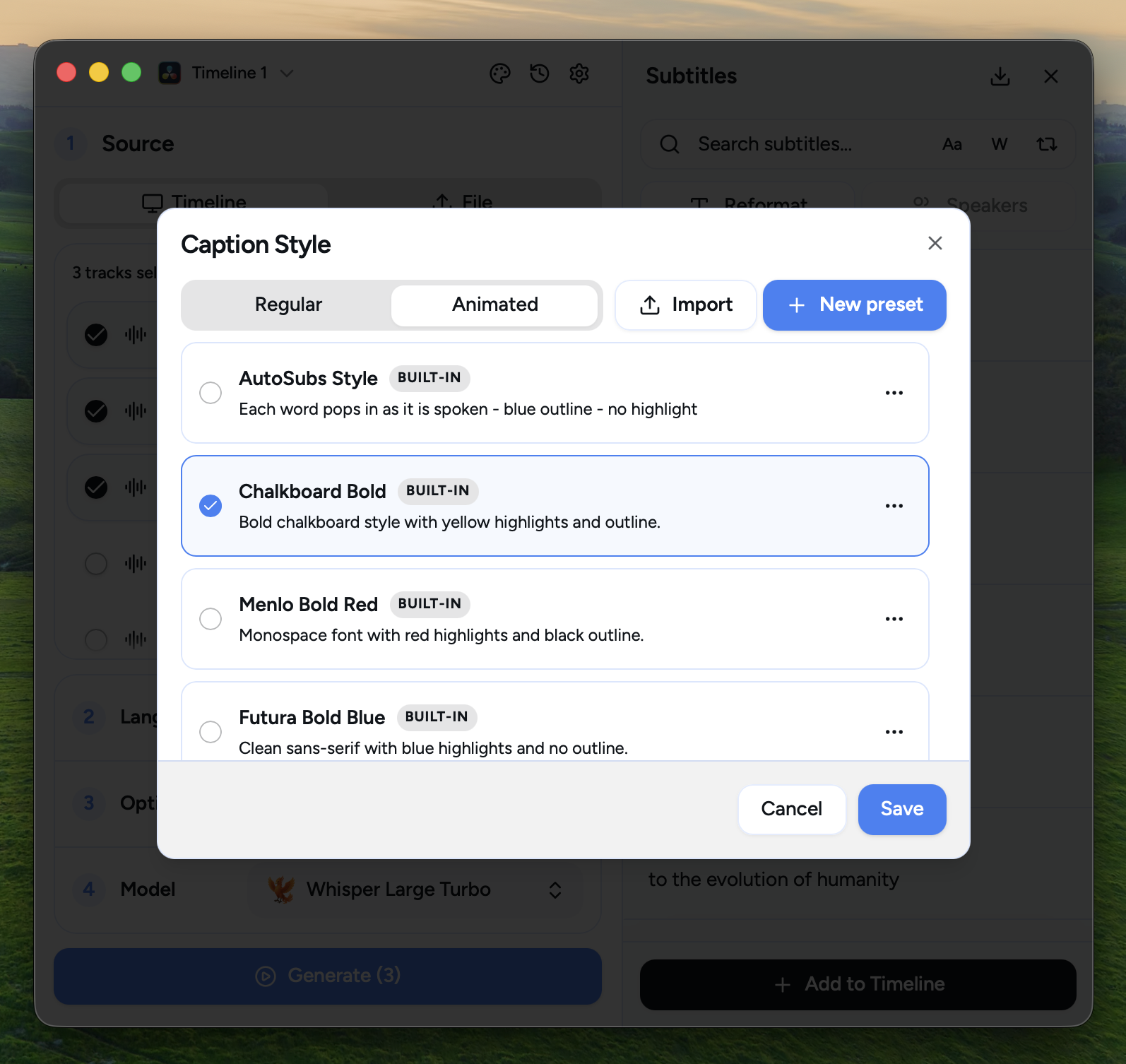
Select a Preset Style | Or create your own
:-------------------------:|:-------------------------:
 |
|
---
PRs are welcome! See CONTRIBUTING.md for how to get started, including the dev setup and a full codebase walkthrough via AutoSubs DeepWiki.
For detailed information about the DaVinci Resolve integration architecture, Lua server, Fusion macro system, and development workflow, see Resolve-Integration/README.md.
---
AutoSubs code is MIT-licensed. The optional MMS forced-alignment weights are downloaded separately and licensed under CC BY-NC 4.0 for noncommercial use. Users are responsible for ensuring their use complies with the model license.
The forced-aligner weights originate from Meta's MMS model, with forced-alignment conversion work by MahmoudAshraf and ONNX/INT8 conversion by onnx-community. Conversion and quantization changes were made by those respective projects; no endorsement is implied.
While MMS supports over a thousand languages, word-level alignment relies on romanizing the transcript with uroman. uroman covers the major world scripts (Latin, Cyrillic, Arabic, CJK, most Indic scripts, etc.), but very low-resource minority languages whose scripts are not included in its data may produce degraded or missing word timestamps.
AutoSubs is built on top of excellent open-source projects:
→ →
→ →
→ →
→ →
→ →
→