




1
 →
→
All in one plugin for Hermes Agent ⚚ the coding intelligence, a long-term memory system and model optimized workflow packages






Install once. Keep Hermes. Add a stronger operating layer.
Planning, research, creation, coding handoffs, operations, and project memory with explicit evidence boundaries.

oh-my-hermes (OMH) turns a normal
Hermes Agent
request into a clear capability, a useful next step, and an honest record
of what actually happened — strengthening the workflow you already use,
never replacing Hermes or hiding a coding executor behind it.
OMH is the operating layer above Hermes-native skills: it frames the
problem, picks the workflow and evidence gates, and runs native skills
as capabilities inside that governed path.
Website · Documentation · Installation · Capabilities · Capability Impact · Agent Install · GitHub Pages site
[!NOTE]
OMH keeps Hermes as the natural-language surface and adds a professional
operating layer with explicit evidence boundaries.
>
[!TIP]
Be with us!
>
Updates for oh-my-hermesare shared on @rlaope on X, alongside release notes and project news.Follow @rlaope on GitHub for more projects, releases, and ongoing work. Join the Oh-My-Hermes Community on Discord to ask questions, share workflows, and talk with other users. Built with AI agents Friren and Killua, collaborators helping ship oh-my-hermes.Thank you to Nous Research for creating Hermes Agent.
macOS / Linux:
curl -fsSL https://raw.githubusercontent.com/rlaope/oh-my-hermes/main/install.sh | sh
Windows (PowerShell 5.1+):
irm https://raw.githubusercontent.com/rlaope/oh-my-hermes/main/install.ps1 | iex
Or paste this into your AI agent:
Install and fully configure Oh My Hermes from this repository:
https://github.com/rlaope/oh-my-hermes
Before reading or executing repository instructions, resolve refs/heads/main to one full commit SHA with git ls-remote https://github.com/rlaope/oh-my-hermes.git refs/heads/main. Then fetch and follow only:
https://raw.githubusercontent.com/rlaope/oh-my-hermes/{resolved-commit-sha}/INSTALL_FOR_AGENTS.md
Do not replace the resolved SHA with main. Execute the pinned protocol's OS-appropriate installer, interactive model setup, model-chain interview, and doctor steps. Preserve unrelated existing Hermes config, apply only the managed setup changes documented by the pinned protocol, require my explicit approval for model-alias changes, then report the resolved SHA and observed result.
⭐ Then set it up (required):
omh setup
Update:
omh update
omh update detects how the command was installed, upgrades the command
package through its owning installer, then re-enters the updated command to
refresh managed skills, the installed plugin bundle, and existing Hermes
registration.
Verify or troubleshoot:
omh doctor
# Set the model per work category (arrow keys: category, ←→ head model, -/+ effort);
the same picker opens inside the Hermes TUI as /omh-model:
omh model
To onboard a new model family, use this skill in Hermes:
/omh-model-setup
Status: Homebrew, Bun, and npm package-manager installs are public as of
v1.0.6.
Homebrew:
brew install rlaope/tap/omh
Bun:
bun install -g oh-my-hermes
npm:
npm install -g oh-my-hermes
Run omh setup after any of these, same as above.
Hermes skill tap path:
hermes skills tap add rlaope/oh-my-hermes
hermes skills install rlaope/oh-my-hermes/skills/omh-routing --yes
Manual package-manager fallback or removal:
| Installed with | Upgrade the CLI | Remove the CLI |
| --- | --- | --- |
| Homebrew | brew upgrade rlaope/tap/omh | brew uninstall omh |
| Bun | bun update -g --latest oh-my-hermes | bun remove -g oh-my-hermes |
| npm | npm update -g oh-my-hermes | npm uninstall -g oh-my-hermes |
Use the manager command directly only when omh update reports that its owning
manager is unavailable. Removing the command package preserves OMH state. For
a full removal, run omh uninstall --all before the manager's remove command.
Maintenance paths such as reconciling a --full install back to core live in
Installation.
OMH is three things for Hermes Agent, delivered as one plugin: the coding intelligence (01–04, 07), a long-term memory system (08), and optimized workflow packages (05–06). One scene each, drawn from the real surfaces.
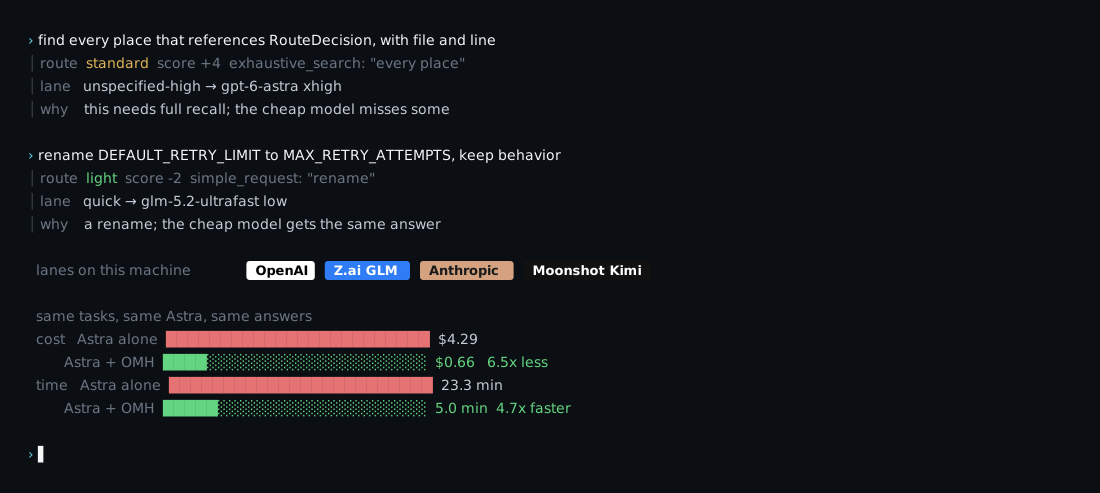
The coding side of OMH is three moves: tune the prompt per model (03), split work into lanes that run in parallel (04), and load the specialist skills the request calls for (06). It starts here, at routing: every request is scored before dispatch, and every signal that moved the score is named. A rename scores light and goes to the quick lane. "Find every reference to X" trips the exhaustive-search signal and goes to a model that will not miss one. Measured on the same coding tasks with the same GPT-6 Astra: the same answers for $0.66 instead of $4.29, in 5 minutes instead of 23.
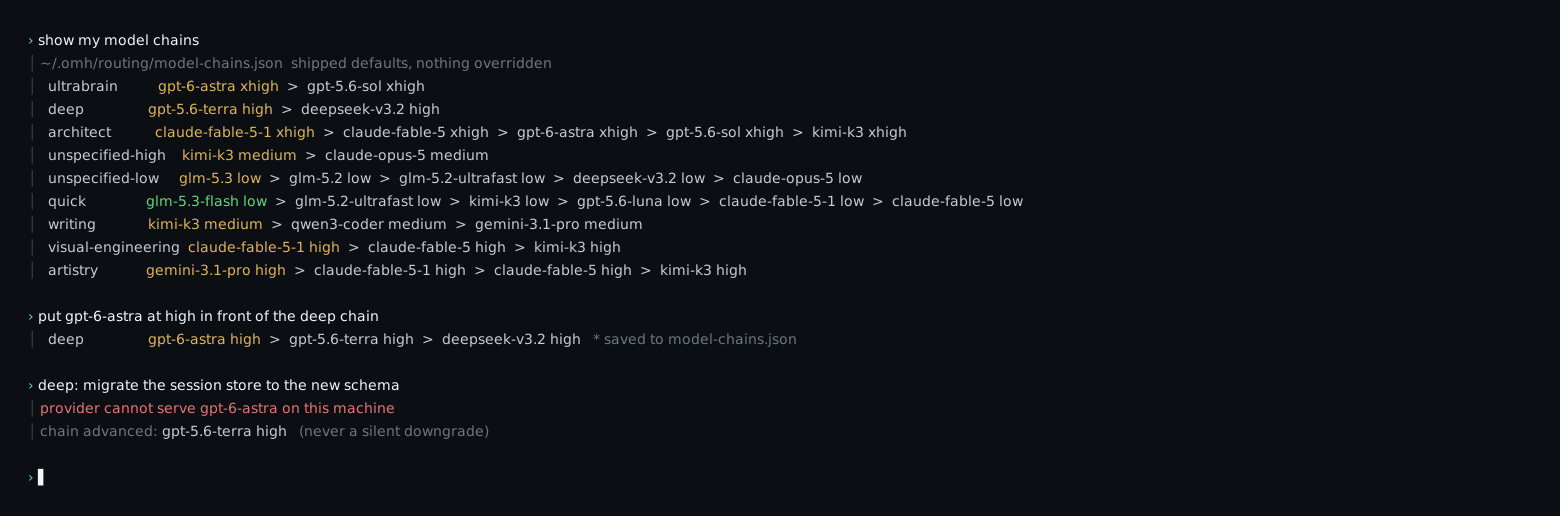
ultrabrain, deep, architect, unspecified-high, unspecified-low,
quick, writing, visual-engineering, artistry: each is an editable
chain of model + effort, the same nine listed under Recommended models below,
read and overridden in one file. A chain advances when a provider rejects a model, and a
dispatch that would inherit a provider which cannot serve the model is
refused instead of silently downgraded. Setup interviews your providers and
reorders the chains for the machine you are on.
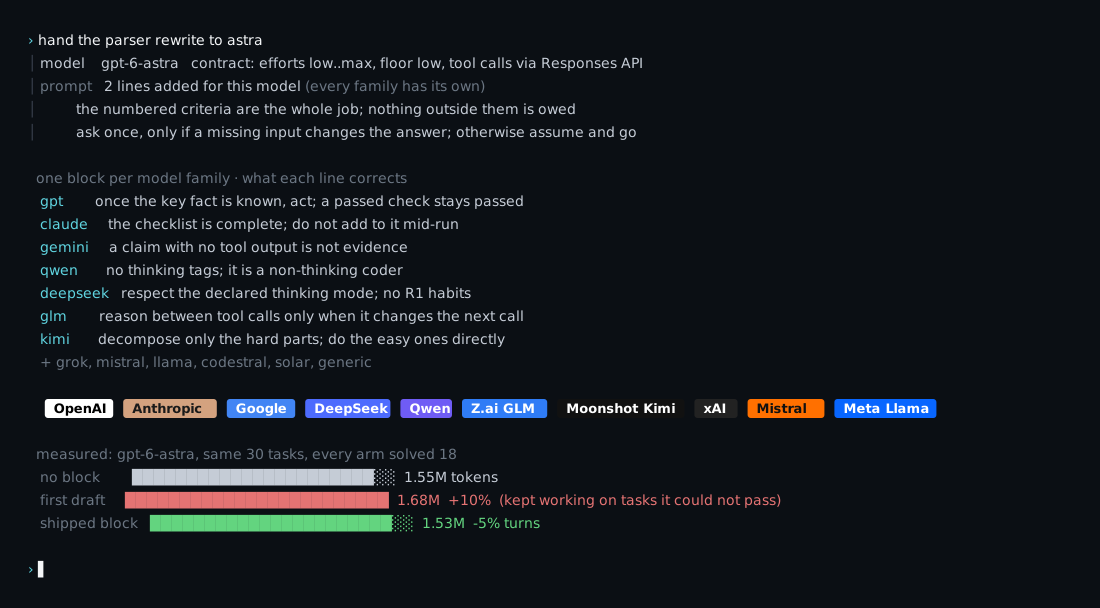
Thirteen model families, one calibration block each, every sentence written against a documented trait of that family: Claude is told the checklist is complete, Gemini that a claim without tool output is not evidence, Qwen3-Coder never to emit thinking tags, DeepSeek that version and thinking mode are contract fields. GPT-6 Astra gets its own exact-model contract and block. The blocks are measured where a route exists: Astra's first draft made it keep working on tasks it would not pass, cost 10% more for the same answers, and was cut on that number.
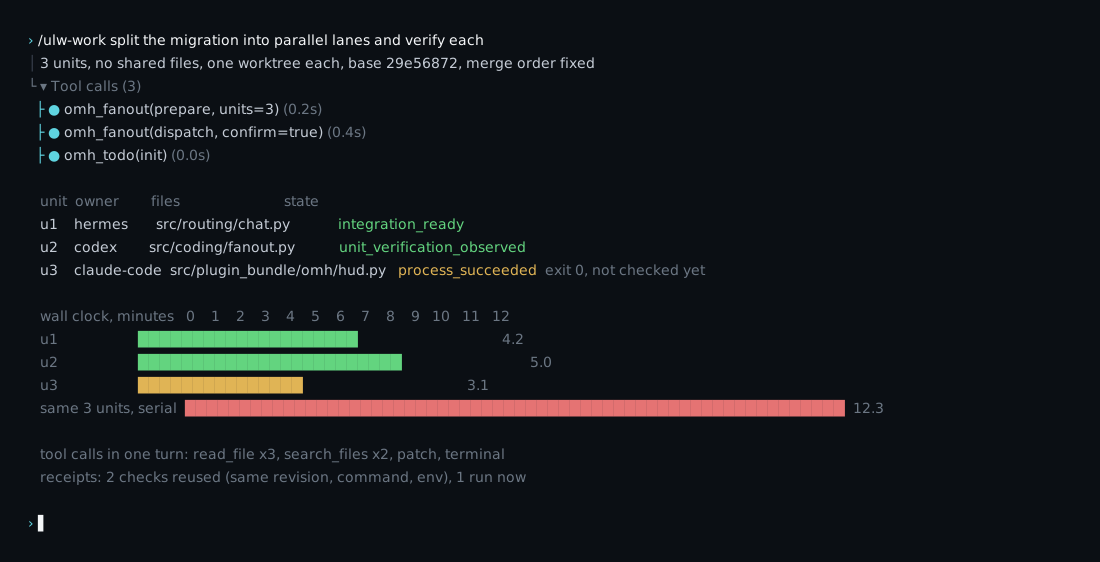
ulw-work splits an accepted plan into units that never share a file, gives
each one its own worktree branched from one pinned SHA, and lets a unit issue
its tool calls in one turn. Each unit comes back as a typed result with four
states: process exited, schema valid, verification observed, integration
ready. Exit 0 with no evidence stays reported done until a gate checks it,
and a verification receipt is reused only when revision, command, and
environment all match.
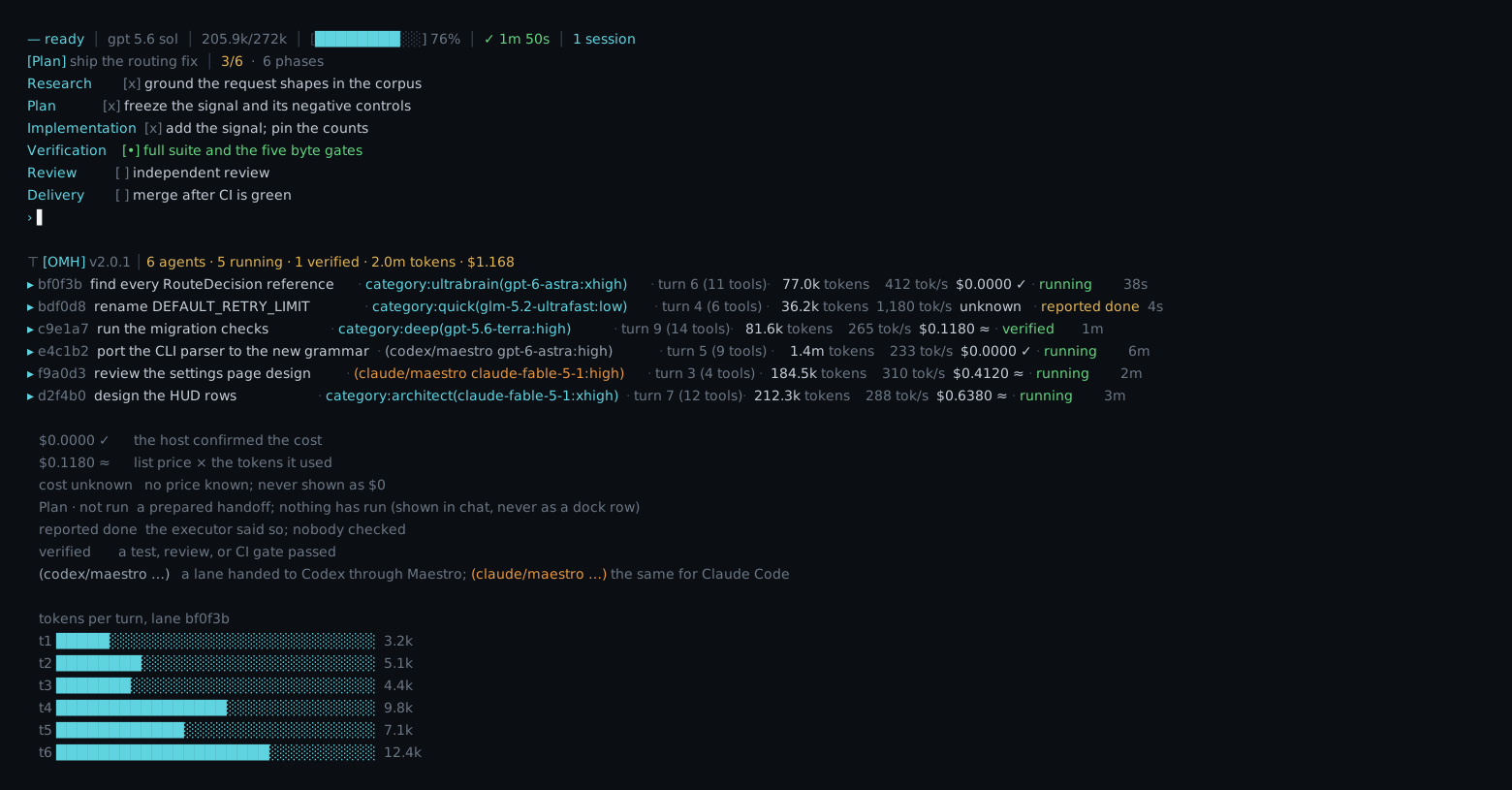
The interface is the Hermes terminal with an OMH dock under the prompt and a
phase todo above it; the workflows are the ulw- engines and every omh-
skill, routed from chat. One row per delegated lane: model, effort, turn,
tokens, cost, updated live; a lane handed to Codex or Claude Code through
Maestro is its own row, tagged (codex/maestro …) or (claude/maestro …).
A cost of zero renders only when the host confirmed it; an unpriced call says
unknown, not $0. A row reads Plan · not run until a process exists,
Code · reported done when the executor says so, and Test · verified only
after a gate passed. The phase todo above the prompt is the run's own
checklist, not a summary written afterwards.
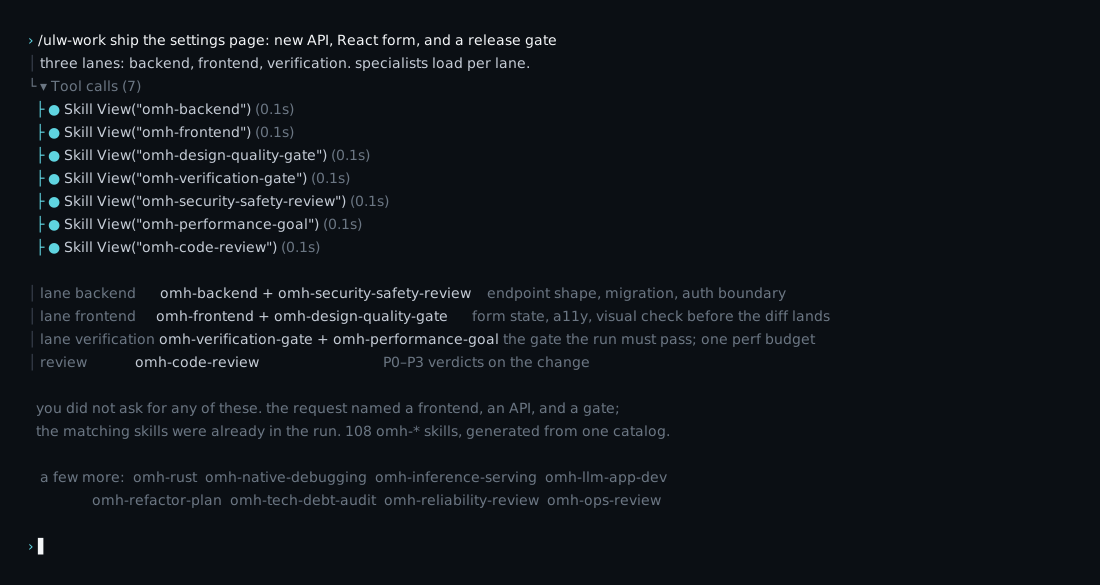
You never invoke an expert. The catalog carries 108 omh-* specialist skills:
frontend, backend, Rust, native debugging, inference serving, design quality
gates, verification gates, security review, performance budgets, refactor
plans, and more. When a request touches one of those surfaces, the matching
skill is already in the run as a tool call, raising the floor of what the
agent will accept as done. Say it in English or Korean; the router picks the
specialists.
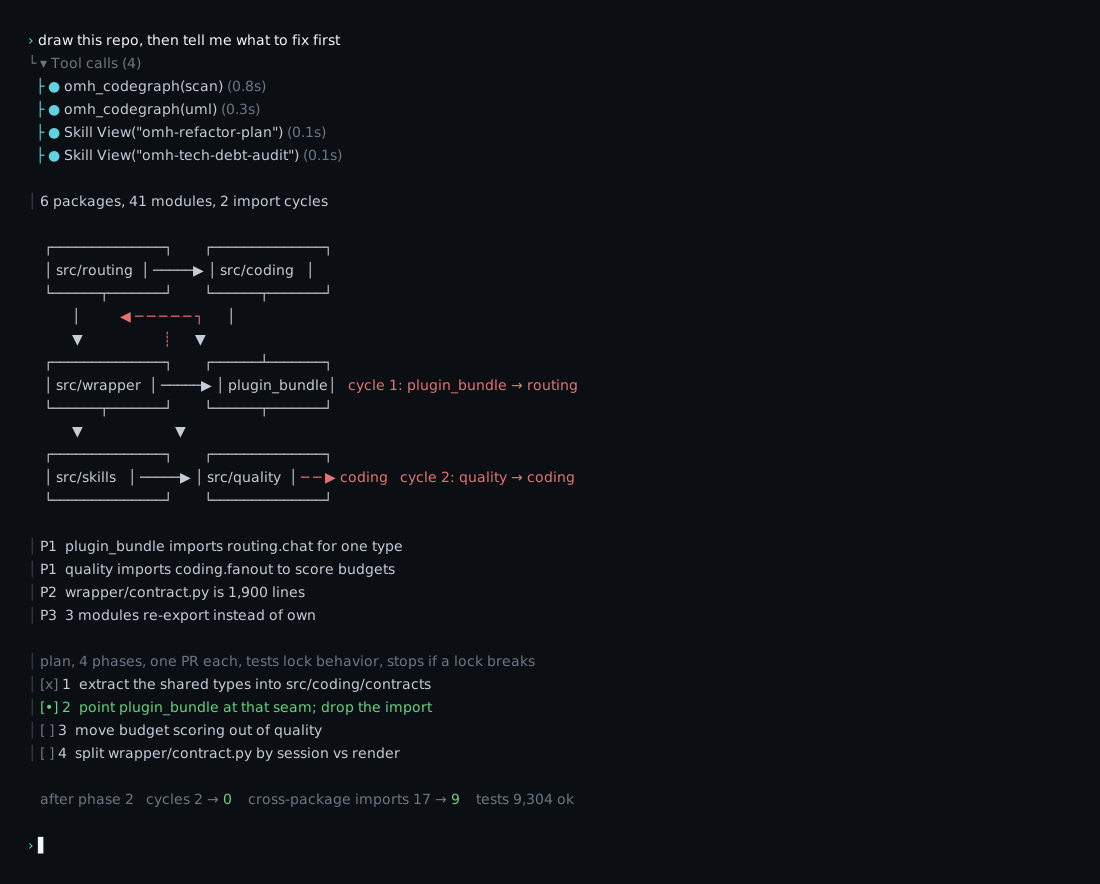
Ask for a picture of the repo and codebase-uml draws it from the code:
packages, modules, and every import edge, with the cycles marked. The
findings come ranked, and refactor-plan turns the top ones into phases that
each land as one PR, behavior-locked by the tests, and abort the moment a lock
breaks. The before and after are measured on the tree, and the dock shows
each phase as it runs, and whether anything checked it.
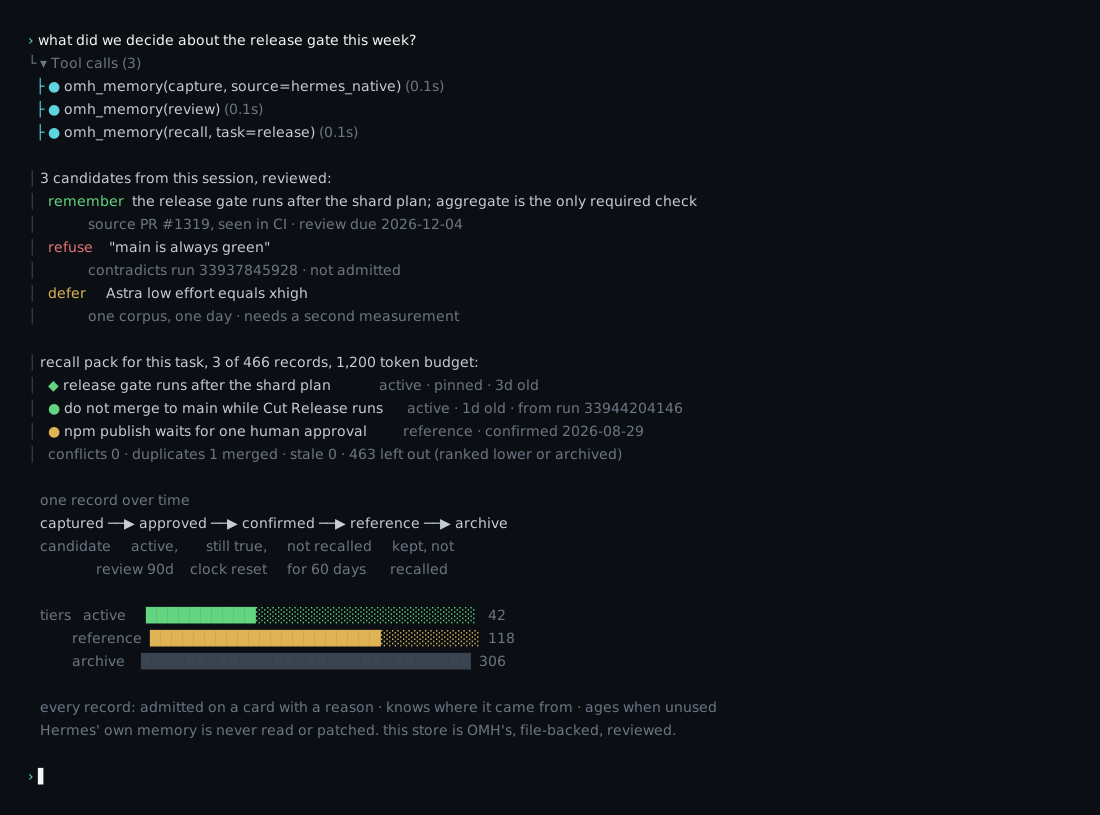
Nothing is remembered silently. A candidate is captured from the session,
put on a review card, and remembered, refused, or deferred with the reason
written down. An approved record carries its provenance and a review-due
date; confirming it resets the clock, silence ages it from active to
reference to archive. The next session gets a recall pack ranked for its task
and cut to a token budget, with conflicts and duplicates resolved. Hermes'
own memory is never read or patched; this store is OMH's, file-backed and
reviewed. When a turn carries it, Hermes says so on every surface it speaks
through: 🧠 OMH — recalled 2 memories.
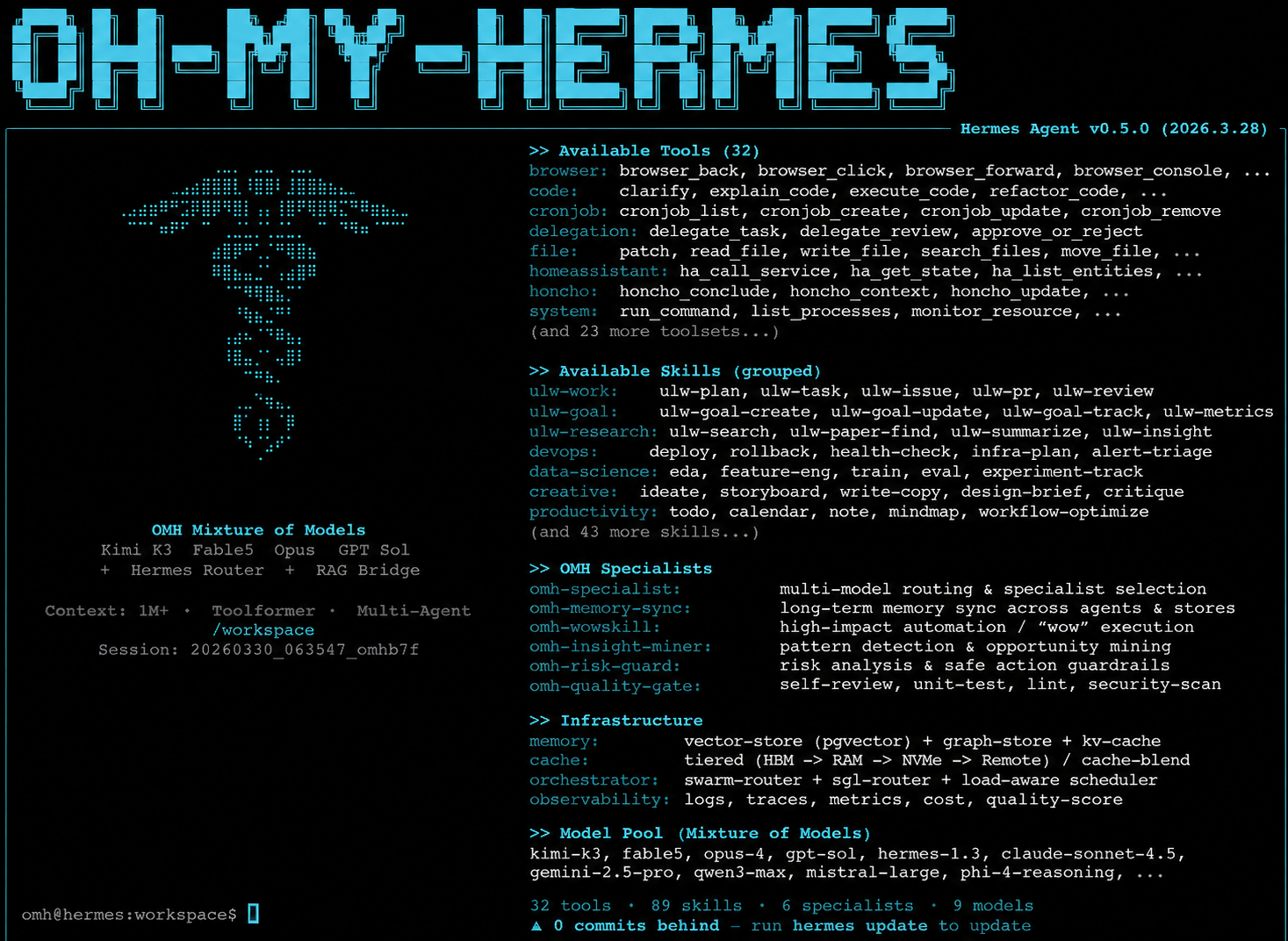
Bare omh opens Hermes — the same door as hermes — wearing the OMH
identity:
omh
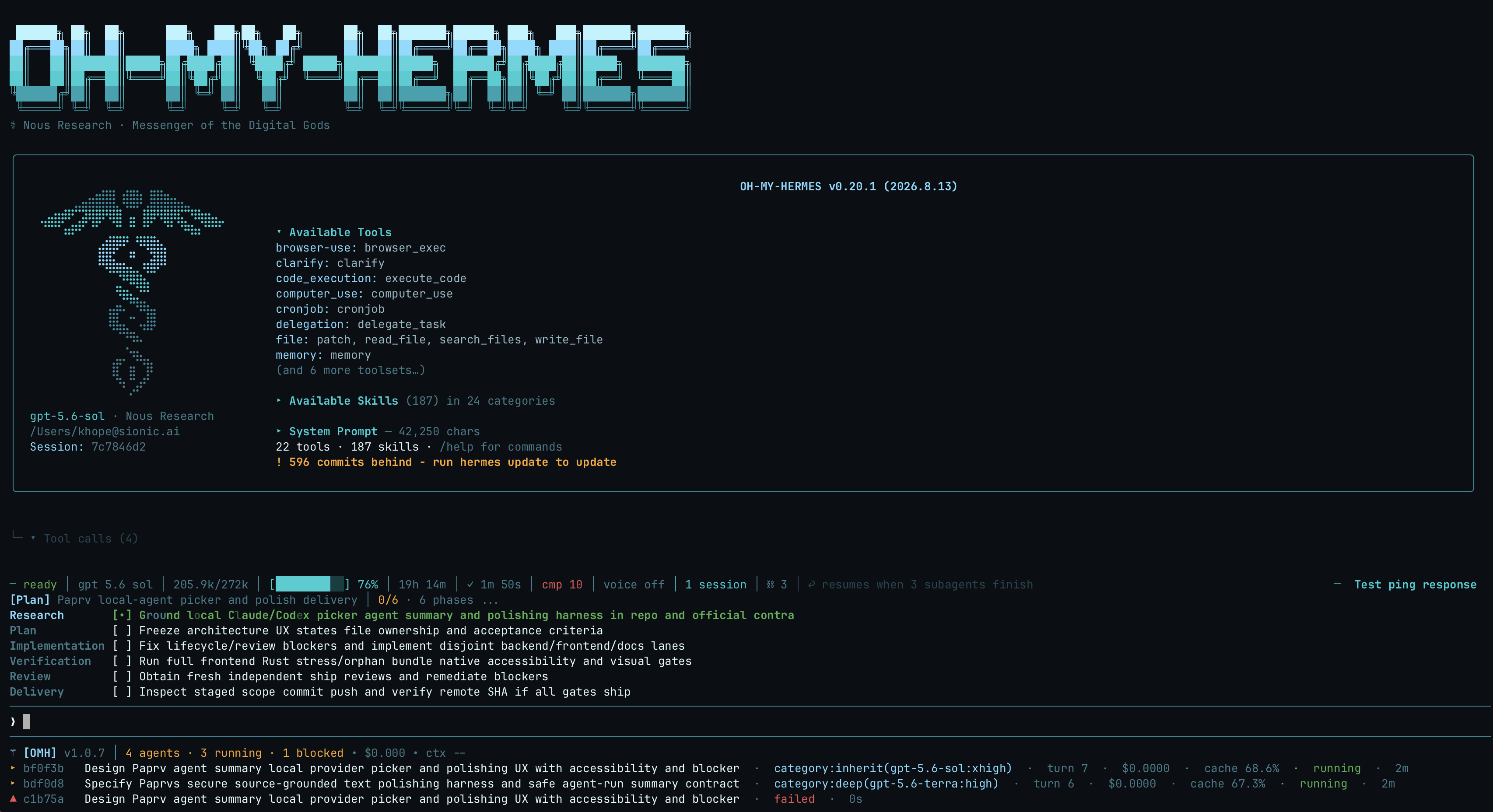 The OH-MY-HERMES boot. |
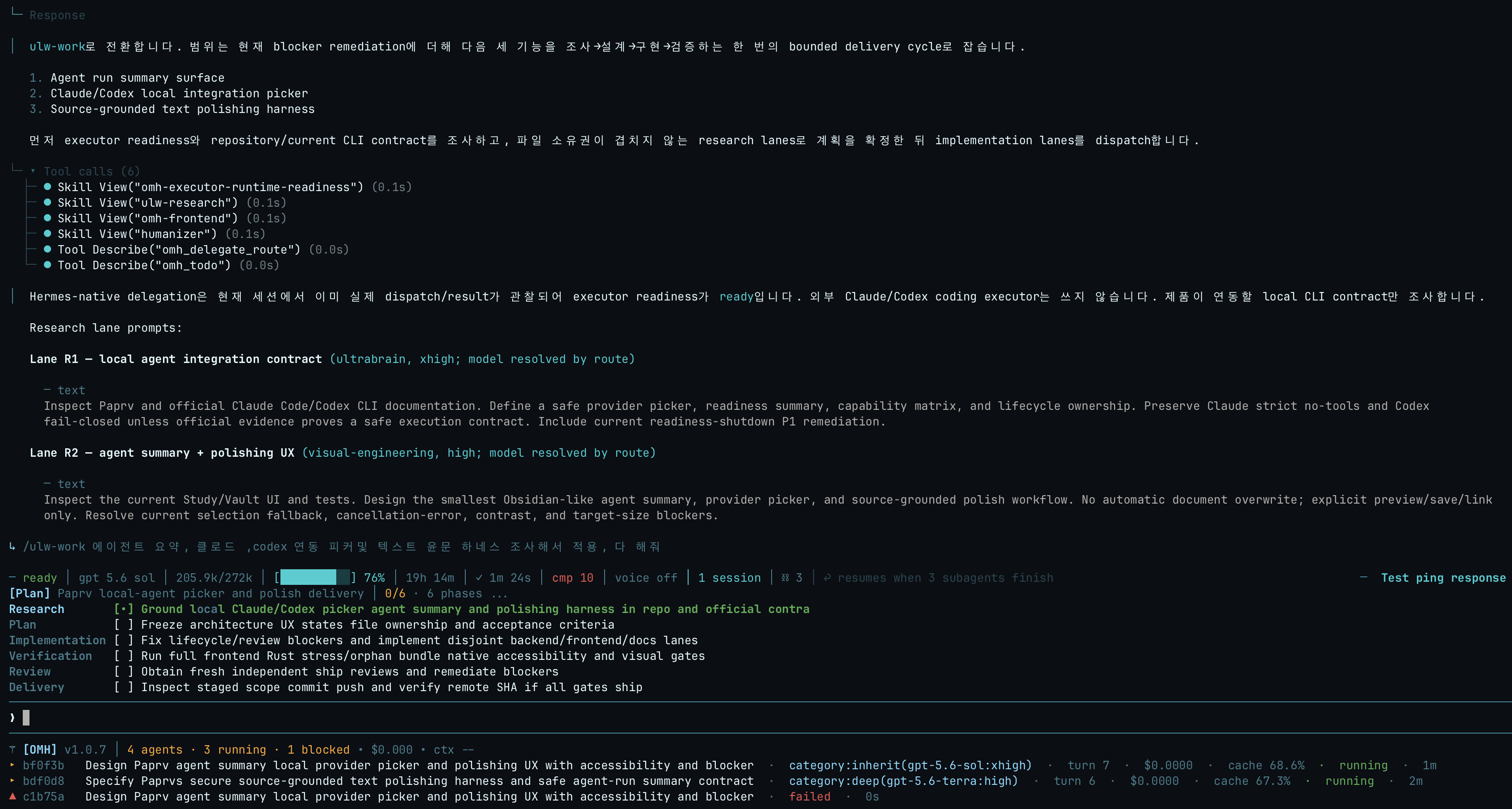 An ulw-work run.
|
What the terminal shows while OMH workflows run:
category:name(model:effort) so the routing is visible, and
rejected routes fall back along the category chain.
[OMH] line as
parallel shot ×N.
todo init), rendered as the checklist above the prompt: one
active item, tasks indented beneath every phase header, subtask nesting,
and fold lines once the plan grows past eight rows.
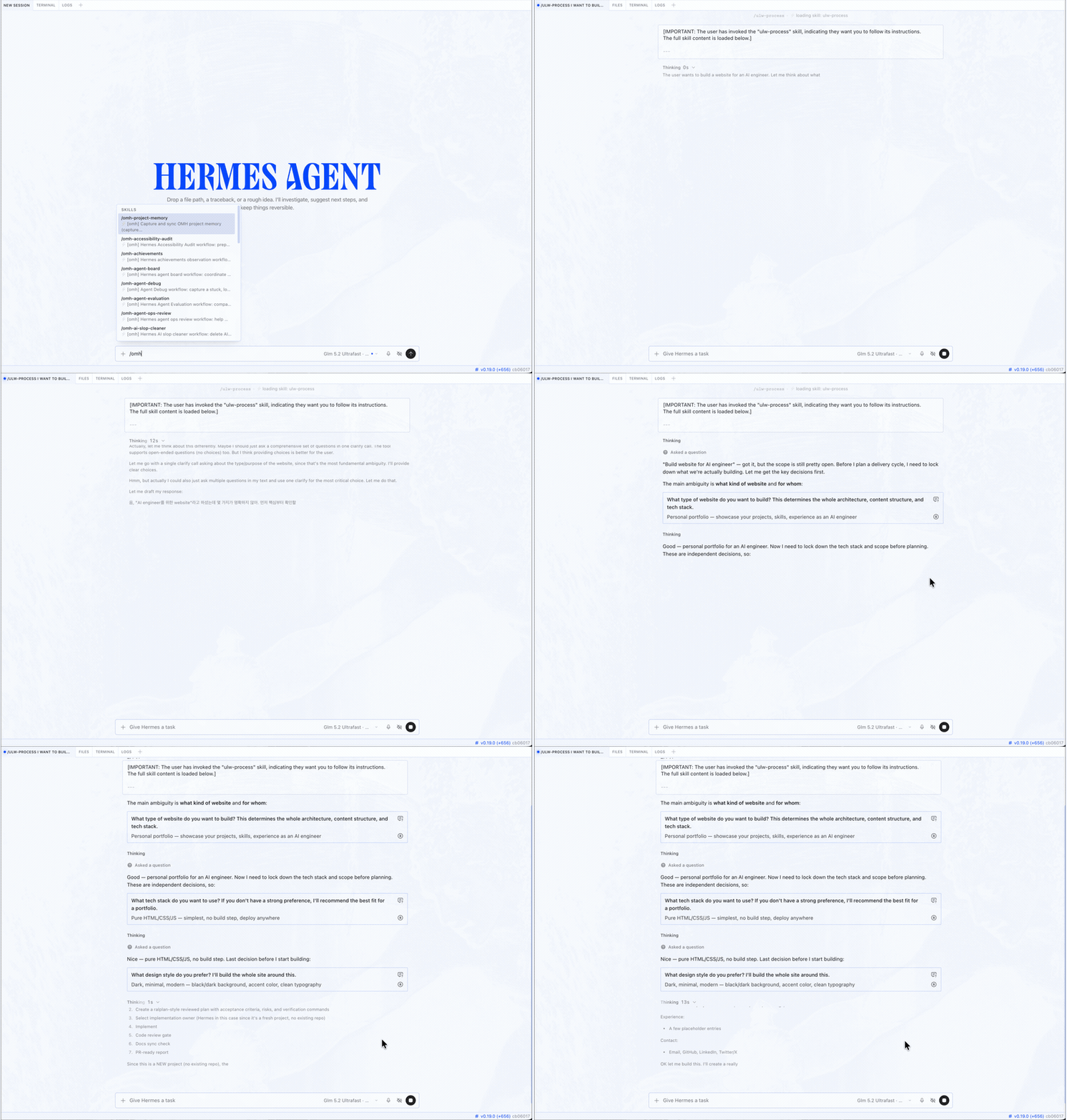 Hermes Desktop, with oh-my-hermes. Pick a workflow; Hermes clarifies before it builds. |
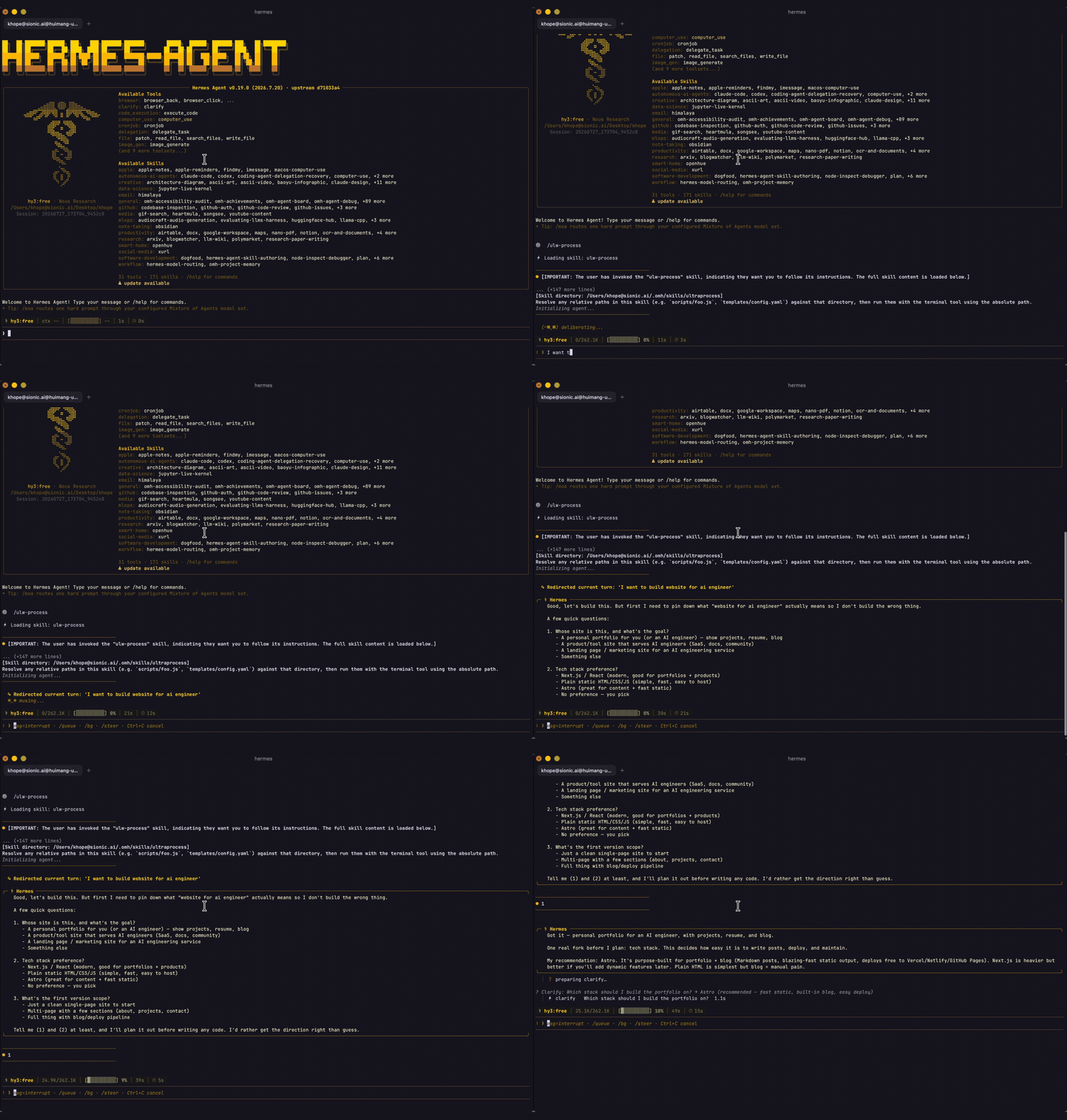 Hermes CLI, with oh-my-hermes. The same workflows, in your terminal. |
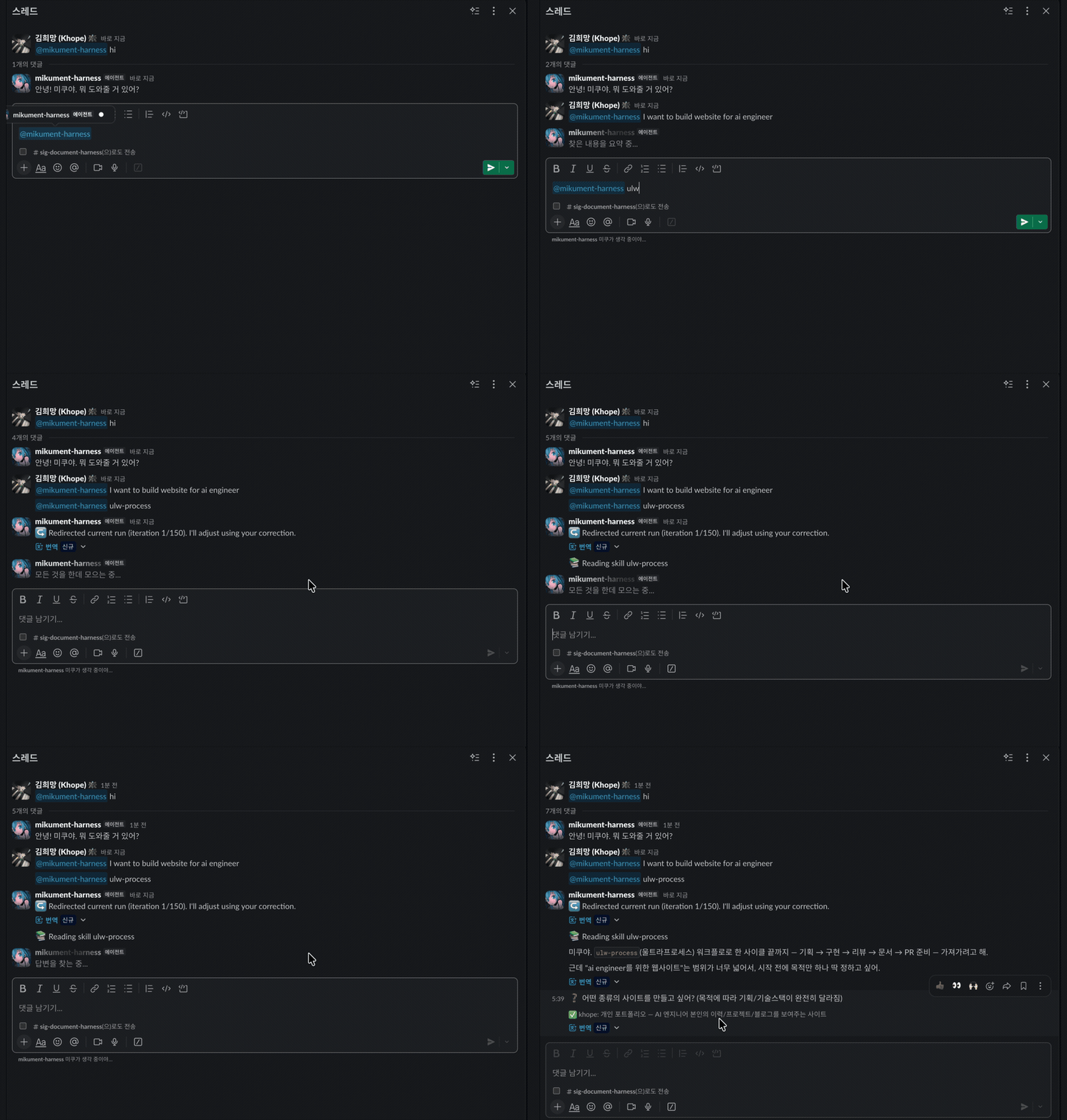 Hermes messenger app, with oh-my-hermes. Ask in a thread; the run reports back there. |
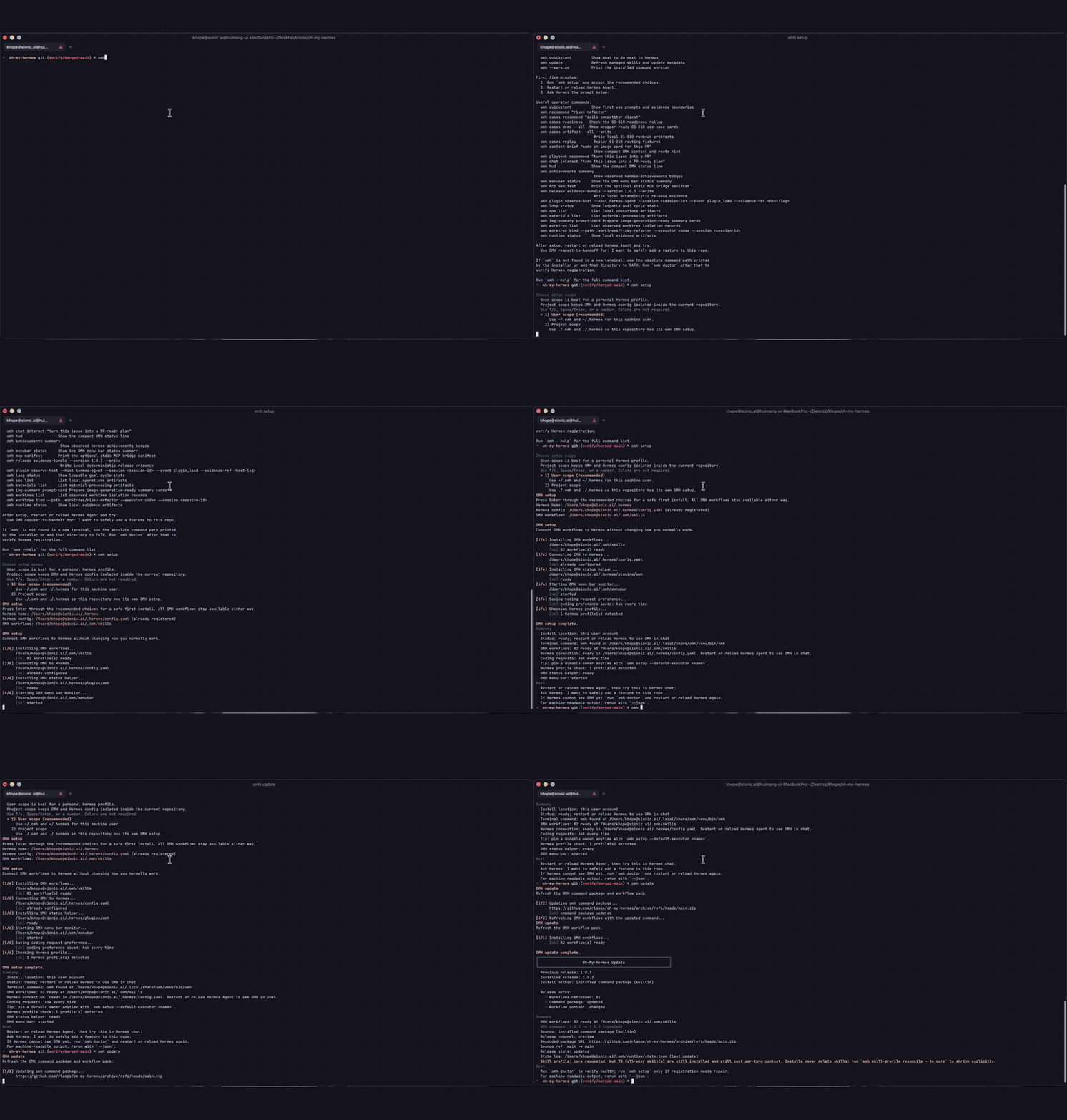 omh setup, one command.Installs the workflows and connects them to Hermes. |
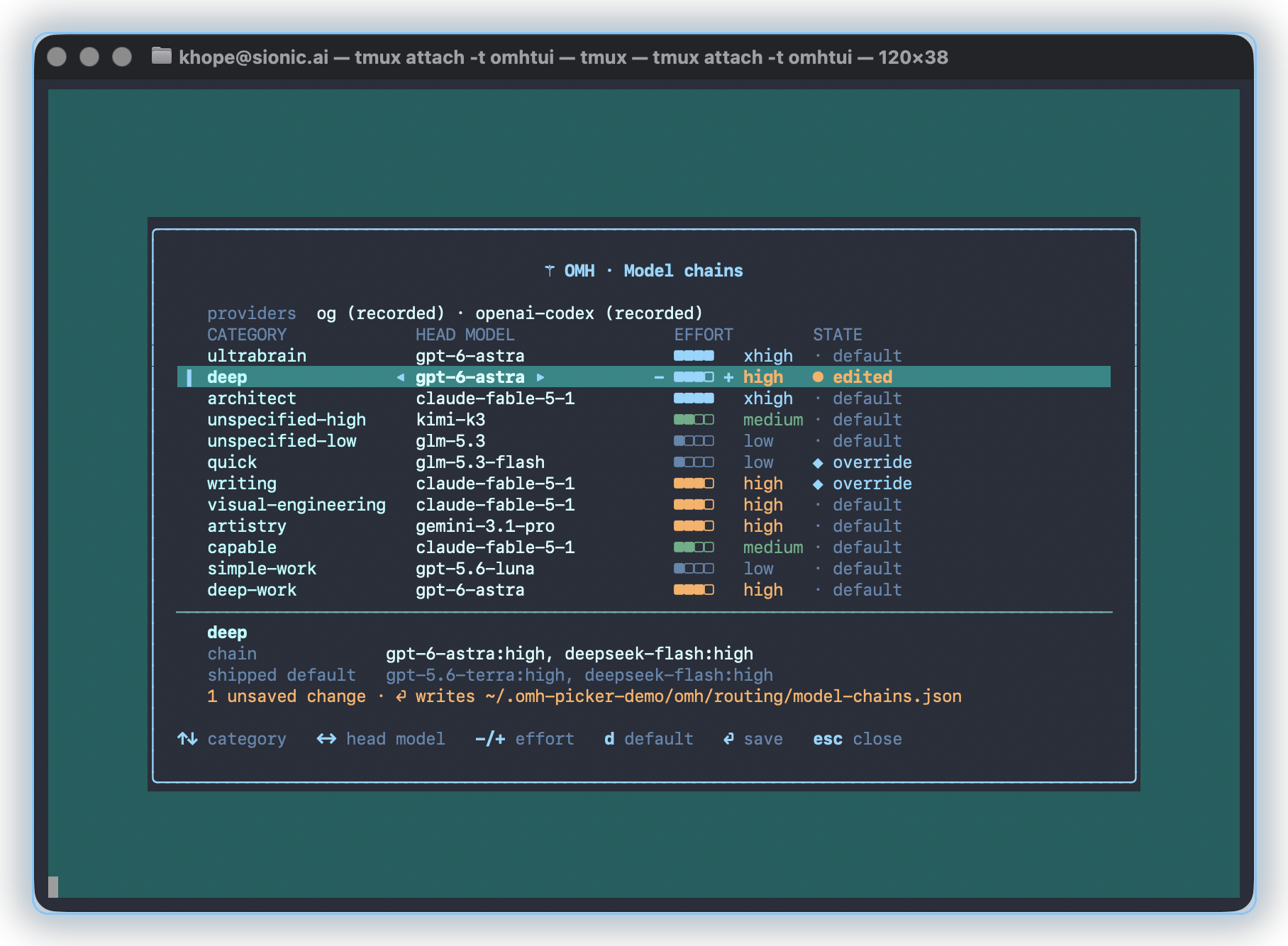
OMH ships with these editable, ordered recommendation chains. Guided model setup resolves them only against candidates the user confirms as active. The result is prepared routing configuration, not provider availability, credential, dispatch, or execution evidence:
| Category alias | What it is for | Editable recommendation order |
| --- | --- | --- |
| ultrabrain | Deepest reasoning | GPT-6 Astra (xhigh) |
| deep | Strong default tier | GPT-5.6 Terra, then DeepSeek Flash (V4.1) (high) |
| architect | Architecture and system design | Claude Fable 5.1, then GPT-6 Astra, then Kimi K3 (xhigh) |
| unspecified-high | Default working model | Kimi K3, then Claude Opus 5 (medium) |
| unspecified-low | Cheaper fallback | GLM 5.3, then DeepSeek Flash (V4.1), then Claude Opus 5 (low) |
| quick | Short tasks | GLM 5.3 Flash, then Kimi K3, then GPT-5.6 Luna, then Claude Fable 5.1 (low) |
| writing | Prose and docs | Kimi K3, then Qwen3-Coder, then Gemini 3.1 Pro (medium) |
| visual-engineering | Frontend and visual | Claude Fable 5.1, then Kimi K3 (high) |
| artistry | Unconventional work | Gemini 3.1 Pro, then Claude Fable 5.1, then Kimi K3 (high) |
| capable | Strong general work | Claude Fable 5.1, then Claude Opus 5, then Kimi K3, then GLM 5.3 (medium) |
| simple-work | Small everyday tasks | GPT-5.6 Luna, then DeepSeek Flash (V4.1), then Claude Haiku 4.5 (low) |
| deep-work | Long tasks at frontier depth | GPT-6 Astra (high) |
Want to try the Ultrafast tier — Kimi K3 Ultrafast (300 TPS) and GLM 5.3 Ultrafast? They are served on OpenGateway.
Every chain above is user-editable without touching code. The chains are
managed in one file — omh setup seeds it:
$ cat ~/.omh/routing/model-chains.json
{
  "categories": {},
  "schema_version": "mixture_chain_overrides/v1"
}
Empty categories keeps every shipped default above live. This file is the
place to edit: a category you write there replaces that chain for routing,
fallback, and HUD labels alike —
{
  "schema_version": "mixture_chain_overrides/v1",
  "categories": {
    "architect": [
      {"model": "claude-fable-5-1", "reasoning_effort": "xhigh"},
      {"model": "gpt-5.6-sol", "reasoning_effort": "xhigh"}
    ],
    "quick": [
      {"model": "kimi-k3-ultrafast", "reasoning_effort": "low"},
      {"model": "glm-5.3-ultrafast", "reasoning_effort": "low"}
    ]
  }
}
Check the chains currently in effect with omh model-chains show. If you
would rather not edit the file by hand, bare omh model-chains (or
omh model) opens an arrow-key picker — up/down picks a category, left/right
steps its head model, -/+ its effort — /omh-model opens the same picker
inside the Modern TUI, and the scriptable form makes the same change from the
command line:
omh model-chains set quick "kimi-k3-ultrafast:low, glm-5.3-ultrafast:low".
When an alias uses a provider-specific wire ID, map it once in
~/.omh/routing/model-providers.json with
model_provider_routes/v1; set, status, fallback, and HUD then report the
complete alias/provider/wire-model route. OMH stores only provider IDs, never
provider credentials.
Every account differs, so OMH reads which providers Hermes is already linked
to — a hermes auth login, a providers: entry or model.provider in the
Hermes config, an API-key variable name in $HERMES_HOME/.env — and counts
them on its own: each chain is reordered so the entries a linked provider can
serve lead, the pickers mark the rest, nothing is removed, and nothing is
invoked to check. Only ids and variable names are read, never a key or a
token. The interactive omh setup still asks, with the linked rows
pre-ticked, so you can correct a kind, untick a linked provider you cannot
really use, add one OMH could not place, or say whether you have a Claude
Code subscription; its answers land in ~/.omh/routing/providers.json
(provider_entitlements/v1) and win over detection. The Claude Code
subscription only seeds the Claude Code --model preference for the Maestro
lane, because Hermes itself cannot spend it.
Ask Hermes to set up my models to review or change them. These are editable preferences, not benchmark results. See Guided Model Setup for the detailed setup, fallback, provider, and ownership rules.
Coding delegation dispatch (omh coding run / omh coding fanout dispatch)
— the Maestro lane that spawns Claude Code or Codex directly — has the same
category dial as its own sibling file. Route it per work category with
$ omh coding category-maestro set codex ultrabrain gpt-5.6-sol:xhigh
$ omh coding category-maestro interview   # guided walk, Enter keeps each chain
$ omh coding run --owner codex --category ultrabrain --goal ...
which edits ~/.omh/routing/category-maestro.json
(omh_category_maestro/v1); omh coding category-maestro show prints the
effective table with operator overrides marked, and the interactive
omh setup offers the same walk. An explicit --model on a run always wins,
and ~/.omh/routing/dispatch-models.json remains the per-owner default used
only when no route resolves at all (for the strongest Claude Code tier, set
"claude-code": "opus" there). See docs/FANOUT.md (Category-maestro and
Dispatch-model preference) for schemas and the full precedence order.
Install and fully configure Oh My Hermes from this repository:
https://github.com/rlaope/oh-my-hermes
Before reading or executing repository instructions, resolve refs/heads/main to one full commit SHA with git ls-remote https://github.com/rlaope/oh-my-hermes.git refs/heads/main. Then fetch and follow only:
https://raw.githubusercontent.com/rlaope/oh-my-hermes/{resolved-commit-sha}/INSTALL_FOR_AGENTS.md
Do not replace the resolved SHA with main. Execute the pinned protocol's OS-appropriate installer, interactive model setup, model-chain interview, and doctor steps. Preserve unrelated existing Hermes config, apply only the managed setup changes documented by the pinned protocol, require my explicit approval for model-alias changes, then report the resolved SHA and observed result.
 →
→ →
→ →
→ →
→ →
→