1
 →
→
A modern platform for visual, flexible, and extensible graph-based investigations. For cybersecurity analysts and investigators.





Flowsint is an open-source OSINT graph exploration tool designed for ethical investigation, transparency, and verification.
Ethics: Please read ETHICS.md for responsible use guidelines.
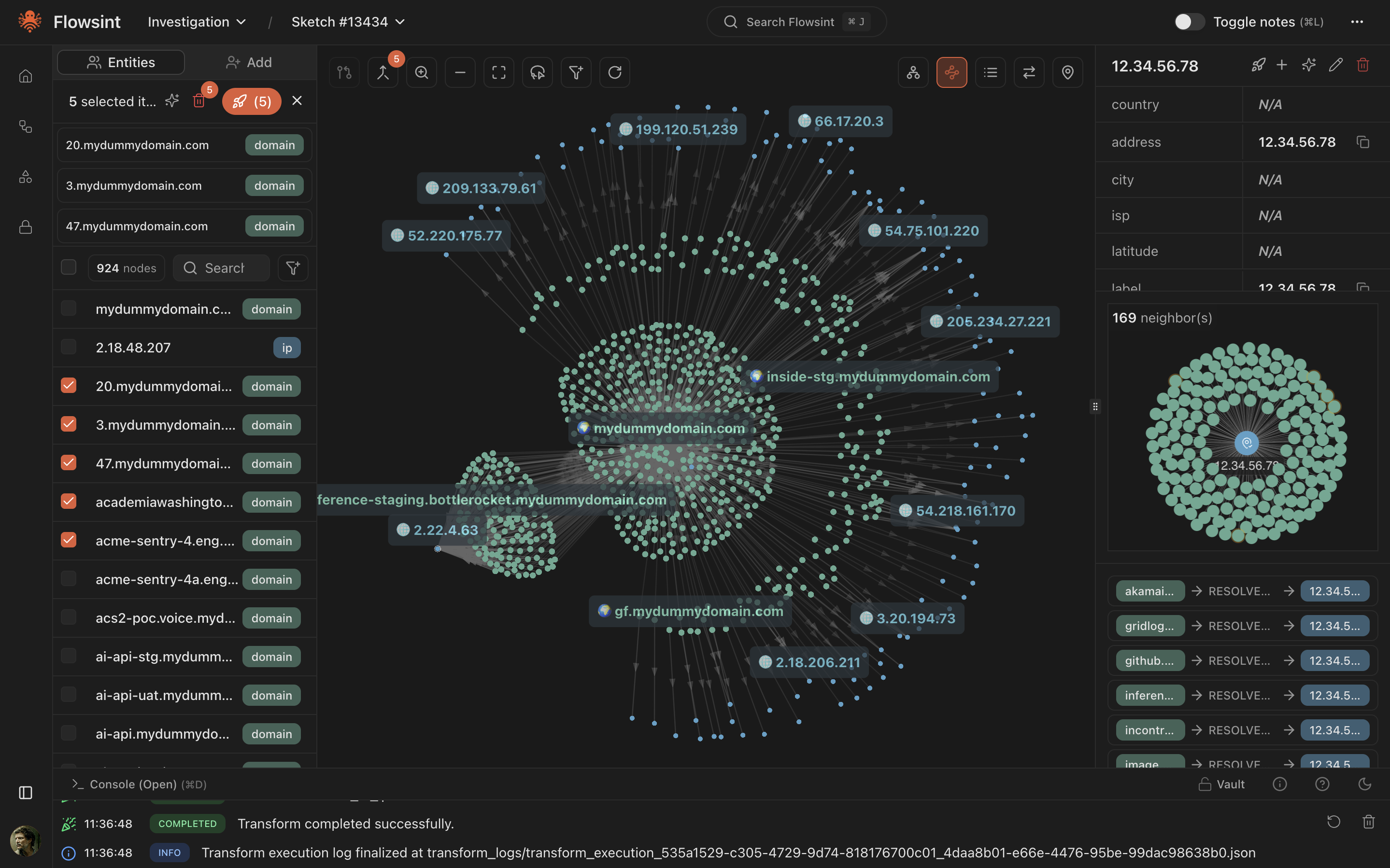
https://github.com/user-attachments/assets/eaabfa81-d7b3-414d-8cf7-f69b4e37bab6
https://github.com/user-attachments/assets/7457d94a-cf1d-4a97-949f-f9b1d8d92644
https://github.com/user-attachments/assets/65c3f26e-7132-4853-be45-21b8933688bd
Flowsint is still in early development and definetly needs the help of the community! Feel free to raise issues, propose features, etc.
Don't want to read ? Got it. Here's your install instructions:
git clone https://github.com/reconurge/flowsint.git
cd flowsint
make prod
No Make needed. Works in both Command Prompt (cmd) and PowerShell.
git clone https://github.com/reconurge/flowsint.git
cd flowsint
copy .env.example .env
copy .env.example flowsint-api\.env
copy .env.example flowsint-core\.env
copy .env.example flowsint-app\.env
docker compose -f docker-compose.prod.yml up -d
This pulls the pre-built images from GitHub Container Registry — no local build needed.
Then go to http://localhost:5173/register and create an account. There are no credentials or account by default.
✅ OSINT investigations need a high level of privacy. Everything is stored on your machine.
The same setup works out of the box on a server: the frontend serves the UI and proxies all API calls internally, so no extra configuration is needed for clients.
git clone https://github.com/reconurge/flowsint.git
cd flowsint
cp .env.example .env
Edit .env — see "Before exposing to a network" below
docker compose -f docker-compose.prod.yml up -d
Anyone on the network can then access Flowsint at http://:5173.
Before exposing to a network, change the default secrets in .env:
AUTH_SECRET — signs authentication tokens. Generate one: openssl rand -hex 32MASTER_VAULT_KEY_V1 — encrypts stored API keys. Generate one: python3 -c "import os, base64; print('base64:' + base64.b64encode(os.urandom(32)).decode())"NEO4J_PASSWORD — Neo4j database password.flowsint-app/nginx.conf (look for map $http_host $is_flowsint_host). The default allowlist accepts only localhost / 127.0.0.1 / [::1], which defends single-user installs against DNS rebinding; LAN and public deploys must opt-in their own hostname. Two commented-out template lines in the same map block show the format.
Only port 5173 is exposed to the network. PostgreSQL, Redis, Neo4j and the API are bound to 127.0.0.1 on the server and reachable only through the frontend proxy.
To pin a specific version instead of latest, set FLOWSINT_VERSION in .env (e.g. FLOWSINT_VERSION=1.2.10).
HTTPS (recommended beyond a trusted LAN): put any reverse proxy in front of port 5173. Example with Caddy:
flowsint.example.com {
    reverse_proxy 127.0.0.1:5173
}
When fronting with a reverse proxy, also bind the app port to localhost in docker-compose.prod.yml ("127.0.0.1:5173:8080") so clients can only go through HTTPS.
Flowsint is a graph-based investigation tool focused on reconnaissance and OSINT (Open Source Intelligence). It allows you to explore relationships between entities through a visual graph interface and automated enrichers.
Domain Enrichers
The project is organized into autonomous modules:
flowsint-app (frontend)
    ↓
flowsint-api (API server)
    ↓
flowsint-core (orchestrator, tasks, vault)
    ↓
flowsint-enrichers (enrichers & tools)
    ↓
flowsint-types (types)
Linux / macOS (requires Make):
make dev
Windows (cmd or PowerShell, no Make — create the .env files first, see Get started):
docker compose -f docker-compose.dev.yml up -d --build
docker compose -f docker-compose.dev.yml logs -f
The app is accessible at http://localhost:5173.
Core utilities and base classes used by all other modules:
Pydantic models for all data types:
Enricher modules that process data:
FastAPI server providing:
Frontend application.
1. Adding new types: Add to flowsint-types module
2. Adding new enrichers: Add to flowsint-enrichers module
3. Adding new API endpoints: Add to flowsint-api module
4. Adding new utilities: Add to flowsint-core module
Each module has its own (incomplete) test suite:
# Test core module
cd flowsint-core
uv run pytest
Test types module
cd ../flowsint-types
uv run pytest
Test enrichers module
cd ../flowsint-enrichers
uv run pytest
Test API module
cd ../flowsint-api
uv run pytest
1. Follow the modular structure 2. Use uv for dependency management 3. Write tests for new functionality 4. Update documentation as needed 5. See CONTRIBUTING.md for the checks to run before committing
---
Ethics: Please read ETHICS.md for responsible use guidelines.
Flowsint is designed strictly for lawful, ethical investigation and research purposes.
It was created to assist:
→ →
→ →
→ →
→ →
→ →
→