1
 →
→
A Kubernetes TUI, reimagined in Rust - built on kube-rs and ratatui, async-first from the ground up.
A Kubernetes TUI written in Rust, on kube-rs and
ratatui. Async everywhere, so the UI never blocks on the
cluster.
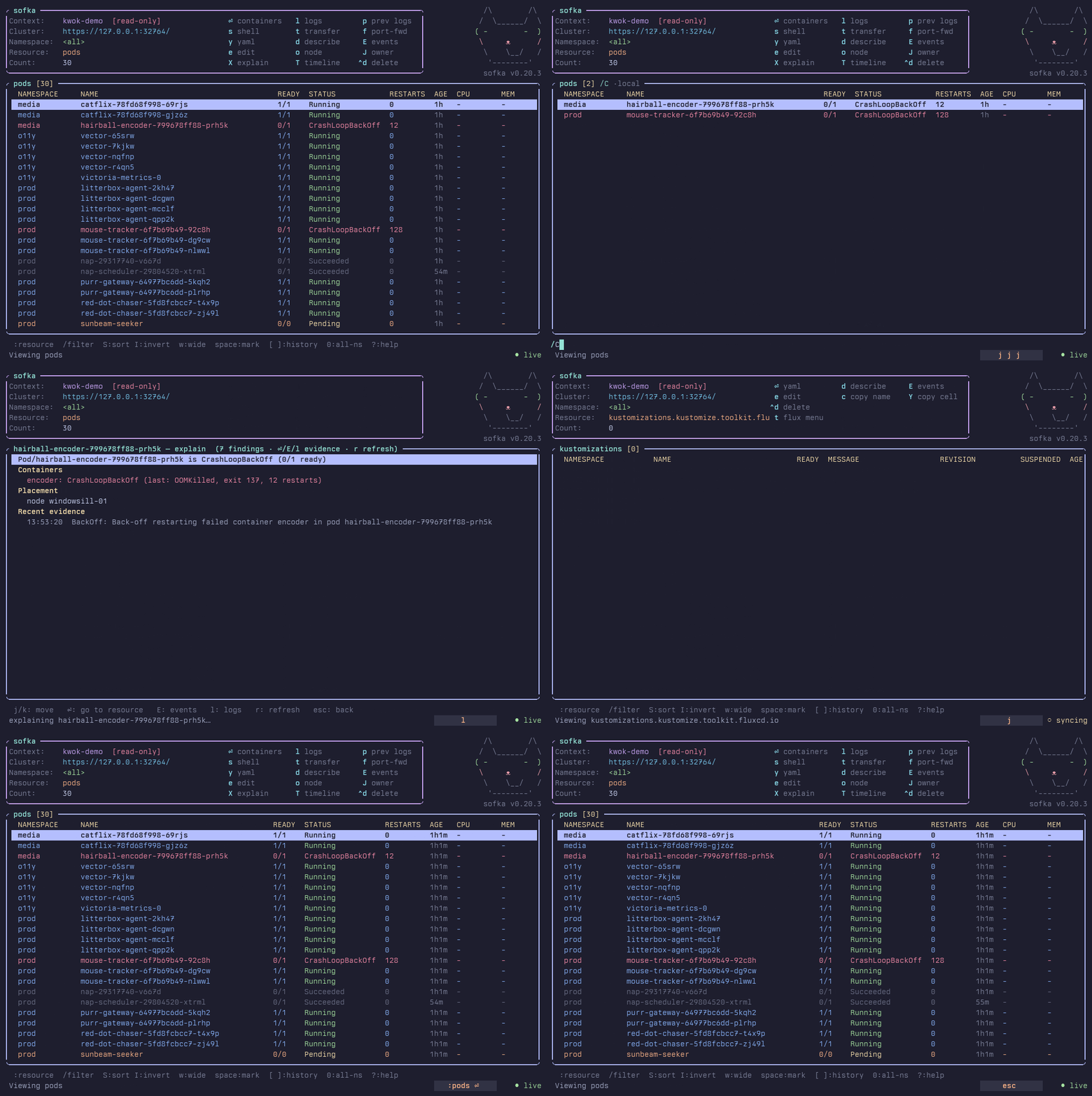
sofka.rs - the website, with a watchable tour of a real session (sofka.rs/#play).
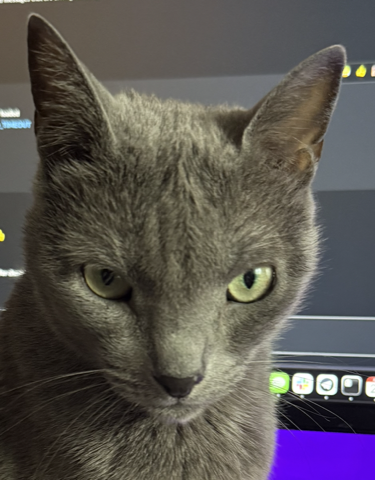
That's Sophie, a Russian Blue. She sits behind the monitor and watches the
screen. Constantly, not sometimes. She has the narrow-eyed look of someone who
has seen a pod in CrashLoopBackOff. She catches every state change and doesn't
get distracted. She is, in effect, a cluster watchman that is a cat.
sofka is the Serbian short form of Sophia, which means "wisdom". A good cluster
TUI and a good cat both watch things closely, and both know when something is
wrong.
sofka is a Kubernetes terminal interface inspired by k9s. It uses a shared object pipeline. Both programs support built-in and custom resources. The main functions are:
enter on a CRD drills into its
custom resources.
t suspends, resumes, and reconciles through native APIflux binary. Plus a native Helm inspector that decodes release
Secrets itself.
t suspends, resumes, and syncs ArgoCD Applications.argocd binary.
X opens a deterministic,space marks rows for delete, kill, or Flux actions across:pf manages them all.
The full feature list is long. So is the comparison with k9s, with shared functions and design differences.
Every release ships prebuilt binaries for macOS (aarch64/x86_64) and Linux (aarch64/x86_64).
brew install nklmilojevic/sofka/sofka   # Homebrew (macOS/Linux)
nix run github:nklmilojevic/sofka       # Nix, nothing to install
cargo install sofka                     # Cargo
Or build from source: cargo build --release (see
Development).
Use the Home Manager module to install Sofka and manage its configuration with Nix.
The release binaries aren't signed or notarized yet, so Gatekeeper refuses a tarball you downloaded in a browser. Nothing is broken. Clear the quarantine flag once:
xattr -d com.apple.quarantine sofka
(Or right-click the binary in Finder, pick Open, confirm once.)
sofka [RESOURCE] [-n NAMESPACE] [-A] [--context NAME] [--kubeconfig PATH] [--readonly | --write]
RESOURCE          resource to open (alias/plural/kind), default: pods
  -n, --namespace   namespace to start in
  -A, --all-namespaces
  --context         kubeconfig context to start in (default: current context)
  --kubeconfig      kubeconfig file to use (sets $KUBECONFIG for the session)
  --allow-v1-client-cert  allow X.509 v1 client certificates for this run
  --readonly        disable every mutating action for the session
  --write           force write mode, overriding any config readonly
Use sofka ctx or sofka contexts to open the context picker before connecting.
Select a context to connect and open its configured default resource, or pods.
--context NAME selects the initial context in the picker. An unknown name
returns an error. -n and -A apply to the first successful selection only. These launch commands
require interactive mode and cannot be used with --check or --snapshot.
--readonly and --write set the mode for the whole session and win over the
config readonly option, including per-cluster and per-context overrides, on
every :ctx switch. With no flag, switching into a context whose config sets
readonly = true enables read-only mode (shown as [read-only] in the header),
and switching away restores write mode.
Headless modes need no TTY and double as CI smoke tests:
sofka --check                # connect, run discovery, print a summary, exit
sofka pods --snapshot        # render one frame of a resource view to stdout
sofka dp -A --snapshot       # deployments, all namespaces
sofka info                   # runtime diagnostics: build, config, discovery, latency, dirs
sofka info --offline         # the same report without connecting to a cluster
sofka plugin search          # search the official reviewed plugin catalog
sofka plugin install ID      # install the latest compatible package
sofka plugin update          # explicitly update all managed packages
sofka plugin list            # offline installed-package inventory
The essentials. ? in the app shows everything, or see the
full key reference.
| Key | Action |
| -------------------- | ------------------------------------------------------------------------------------------------- |
| : | command palette - fuzzy over kinds, commands, bookmarks, workspaces (:deploy social also works) |
| / | filter: fuzzy · "exact" · /regex/ · !inverse · -l/-f selectors · status=X age<2h |
| enter / esc | drill down / go back |
| j/k, g/G | navigate |
| ctrl-f / ctrl-b | page forward / back (also PgDn / PgUp) |
| n / 0 / :ctx | namespace switcher / all namespaces / context switcher |
| space | mark row for bulk actions |
| y / d / E | YAML / describe / live events |
| l / L | logs / VictoriaLogs history |
| X / T | explain why it's unhealthy / state-change timeline |
| s / e / a | shell or scale / edit in $EDITOR / attach |
| f | port-forward - port picker from manifest, ● marks active forwards (:pf manages them) |
| t | Flux/ArgoCD menu · CronJob trigger · pod file transfer |
| r / i | rollout restart / set container image |
| ctrl-d / ctrl-k | delete / force-delete (marked rows, or current) |
| S / w / ctrl-e | sort picker / wide columns / compact mode |
| ? / :q | help / quit |
Use config.toml, config.yaml, or config.yml under $XDG_CONFIG_HOME/sofka
(or ~/.config/sofka). Keep one file at each config level. All
optional - an empty config behaves like no config. :reload re-reads it live.
default_namespace = "kube-system"
default_resource  = "deployments"
readonly          = false
favorite_namespaces = ["kube-system", "monitoring"]
[aliases]
dep = "deployments"
[skin]
name = "gruvbox-dark"   # omit to auto-detect dark/light
Any option can be overridden per cluster or per kubeconfig context, so prod can be read-only in a light skin while everything else stays as is. See the configuration reference for the rest.
| Doc | What's in it |
| ---------------------------------------------- | ----------------------------------------------------------- |
| Features | the complete feature list |
| vs k9s | shared functions and design differences |
| Performance benchmark | measured TUI latency, memory use, and binary size |
| Keys | full keymap, per-view keys |
| Configuration | every config section, per-cluster/per-context overrides |
| Views and thresholds | custom columns, CRD printer columns, coloring bands |
| Plugins | plugins, bookmarks, workspaces, saved forwards |
| Safety | read-only mode, guardrails, :can-i, action journal |
| Providers | right-sizing, VictoriaLogs, fleet dashboard |
| Debugging | explain, timeline, diff, notifications, debug pods, bundles |
| Architecture | module layout, data flow, dev loop, release process |
Dual-licensed under MIT or Apache-2.0, at your option - the Rust ecosystem standard.
→ →
→ →
→ →
→ →
→ →
→