1
 →
→
Slick, declarative command line video editing & API




Editly is a tool and framework for declarative NLE (non-linear video editing) using Node.js and ffmpeg. Editly allows you to easily and programmatically create a video from a set of clips, images, audio and titles, with smooth transitions and music overlaid.
Editly has a simple CLI for quickly assembling a video from a set of clips or images, or you can use its more flexible JavaScript API.
Inspired by ffmpeg-concat, editly is much faster and doesn't require much storage because it uses streaming editing. Editly aims to be very extensible and feature rich with a pluggable interface for adding new dynamic content.
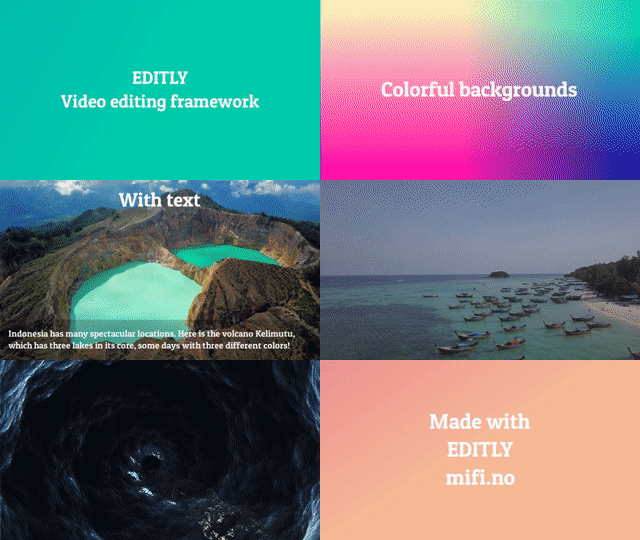
This GIF / YouTube was created with this command: "editly commonFeatures.json5". See more examples here.
cutFrom/cutTo segment length with each clip's durationVideo must be 1337x1000 30fps)ffmpeg (and ffprobe) installed and available in PATHnpm i -g editly
Run editly --help for usage
Create a simple randomized video edit from videos, images and text with an audio track:
editly \
  title:'My video' \
  clip1.mov \
  clip2.mov \
  title:'My slideshow' \
  img1.jpg \
  img2.jpg \
  title:'THE END' \
  --fast \
  --audio-file-path /path/to/music.mp3
Or create an MP4 (or GIF) from a JSON or JSON5 edit spec _(JSON5 is just a more user friendly JSON format)_:
editly my-spec.json5 --fast --keep-source-audio --out output.gif
For examples of how to make a JSON edit spec, see below or examples.
Without --fast, it will default to using the width, height and frame rate from the first input video. All other clips will be converted to these dimensions. You can of course override any or all of these parameters.
--audio-file-path at the video file. _Be sure to respect their license!_import editly from "editly";
// See editSpec documentation
await editly(editSpec);
Edit specs are JavaScript / JSON objects describing the whole edit operation with the following structure:
{
  outPath,
  width,
  height,
  fps,
  allowRemoteRequests: false,
  defaults: {
    duration: 4,
    transition: {
      duration: 0.5,
      name: 'random',
      audioOutCurve: 'tri',
      audioInCurve: 'tri',
    },
    layer: {
      fontPath,
      // ...more layer defaults
    },
    layerType: {
      'fill-color': {
        color: '#ff6666',
      }
      // ...more per-layer-type defaults
    },
  },
  clips: [
    {
      transition,
      duration,
      layers: [
        {
          type,
          // ...more layer-specific options
        }
        // ...more layers
      ],
    }
    // ...more clips
  ],
  audioFilePath,
  loopAudio: false,
  keepSourceAudio: false,
  clipsAudioVolume: 1,
  outputVolume: 1,
  audioTracks: [
    {
      path,
      mixVolume: 1,
      cutFrom: 0,
      cutTo,
      start: 0,
    },
    // ...more audio tracks
  ],
  audioNorm: {
    enable: false,
    gaussSize: 5,
    maxGain: 30,
  }
// Testing options:
  enableFfmpegLog: false,
  verbose: false,
  fast: false,
}
| Parameter | CLI equivalent | Description | Default | |
| ----------------------------------- | ------------------------- | ------------------------------------------------------------------------------------------------------------------------------------------------------------------------- | --------------------------------------------------------- | -------------------- |
| outPath | --out | Output path (mp4, mkv), can also be a .gif | | |
| width | --width | Width which all media will be converted to | 640 | |
| height | --height | Height which all media will be converted to | auto based on width and aspect ratio of first video | |
| fps | --fps | FPS which all videos will be converted to | First video FPS or 25 | |
| customOutputArgs | | Specify custom output codec/format arguments for ffmpeg (See example) | auto (h264) | |
| allowRemoteRequests | --allow-remote-requests | Allow remote URLs as paths | false | |
| fast | --fast, -f | Fast mode (low resolution and FPS, useful for getting a quick preview ⏩) | false | |
| defaults.layer.fontPath | --font-path | Set default font to a .ttf | System font | |
| defaults.layer.* | | Set any layer parameter that all layers will inherit | | |
| defaults.duration | --clip-duration | Set default clip duration for clips that don't have an own duration | 4 | sec |
| defaults.transition | | An object { name, duration } describing the default transition. Set to null to disable transitions | | |
| defaults.transition.duration | --transition-duration | Default transition duration | 0.5 | sec |
| defaults.transition.name | --transition-name | Default transition type. See Transition types | random | |
| defaults.transition.audioOutCurve | | Default fade out curve in audio cross fades | tri | |
| defaults.transition.audioInCurve | | Default fade in curve in audio cross fades | tri | |
| clips[] | | List of clip objects that will be played in sequence. Each clip can have one or more layers. | | |
| clips[].duration | | Clip duration. See defaults.duration. If unset, the clip duration will be that of the first video layer. | defaults.duration | |
| clips[].transition | | Specify transition at the end of this clip. See defaults.transition | defaults.transition | |
| clips[].layers[] | | List of layers within the current clip that will be overlaid in their natural order (final layer on top) | | |
| clips[].layers[].type | | Layer type, see below | | |
| clips[].layers[].start | | What time into the clip should this layer start | | sec |
| clips[].layers[].stop | | What time into the clip should this layer stop | | sec |
| audioTracks[] | | List of arbitrary audio tracks. See audio tracks. | [] | |
| audioFilePath | --audio-file-path | Set an audio track for the whole video. See also audio tracks | | |
| loopAudio | --loop-audio | Loop the audio track if it is shorter than video? | false | |
| keepSourceAudio | --keep-source-audio | Keep source audio from clips? | false | |
| clipsAudioVolume | | Volume of audio from clips relative to audioTracks. See audio tracks. | 1 | |
| outputVolume | --output-volume | Adjust output volume (final stage). See example | 1 | e.g. 0.5 or 10dB |
| audioNorm.enable | | Enable audio normalization? See audio normalization. | false | |
| audioNorm.gaussSize | | Audio normalization gauss size. See audio normalization. | 5 | |
| audioNorm.maxGain | | Audio normalization max gain. See audio normalization. | 30 | |
transition.name can be any of gl-transitions, or any of the following: directional-left, directional-right, directional-up, directional-down, random or dummy.
See examples and commonFeatures.json5
For video layers, if parent clip.duration is specified, the video will be slowed/sped-up to match clip.duration. If cutFrom/cutTo is set, the resulting segment (cutTo-cutFrom) will be slowed/sped-up to fit clip.duration. If the layer has audio, it will be kept (and mixed with other audio layers if present.)
| Parameter | Description | Default | |
| ------------ | ---------------------------------------------------------------- | -------------- | ----------------- |
| path | Path to video file | | |
| resizeMode | See Resize modes | | |
| cutFrom | Time value to cut from | 0 | sec |
| cutTo | Time value to cut to | _end of video_ | sec |
| width | Width relative to screen width | 1 | 0 to 1 |
| height | Height relative to screen height | 1 | 0 to 1 |
| left | X-position relative to screen width | 0 | 0 to 1 |
| top | Y-position relative to screen height | 0 | 0 to 1 |
| originX | X anchor | left | left or right |
| originY | Y anchor | top | top or bottom |
| mixVolume | Relative volume when mixing this video's audio track with others | 1 | |
Audio layers will be mixed together. If cutFrom/cutTo is set, the resulting segment (cutTo-cutFrom) will be slowed/sped-up to fit clip.duration. The slow down/speed-up operation is limited to values between 0.5x and 100x.
| Parameter | Description | Default | |
| ----------- | -------------------------------------------------------- | --------------- | --- |
| path | Path to audio file | | |
| cutFrom | Time value to cut from | 0 | sec |
| cutTo | Time value to cut to | clip.duration | sec |
| mixVolume | Relative volume when mixing this audio track with others | 1 | |
This is a special case of audioTracks that makes it easier to start the audio relative to clips start times without having to calculate global start times.
detached-audio has the exact same properties as audioTracks, except start time is relative to the clip's start.
Example of detached audio tracks
Full screen image
| Parameter | Description | Default | |
| ------------ | --------------------------------- | ------- | --- |
| path | Path to image file | | |
| resizeMode | See Resize modes | | |
See also See Ken Burns parameters.
Image overlay with a custom position and size on the screen. NOTE: If you want to use animated GIFs use video instead.
| Parameter | Description | Default | |
| ---------- | --------------------------------------------- | ------- | --- |
| path | Path to image file | | |
| position | See Position parameter | | |
| width | Width (from 0 to 1) where 1 is screen width | | |
| height | Height (from 0 to 1) where 1 is screen height | | |
See also Ken Burns parameters.
fontPath - See defaults.layer.fontPathtext - Title text to show, keep it shorttextColor - default #ffffffposition - See Position parameterfontPath - See defaults.layer.fontPathtext - Subtitle text to showtextColor - default #ffffffTitle with background
text - See type titletextColor - See type titlebackground - { type, ... } - See type radial-gradient, linear-gradient or fill-colorfontPath - See type titlefontPath - See defaults.layer.fontPathtexttextColor - default #ffffffbackgroundColor - default #d02a42position - See Position parameterfontPath - See defaults.layer.fontPathtextfontSizecharSpacingcolorposition - See Position parametercolor - Color to fill background, default: randomizecolors - Array of two colors, default: randomizecolors - Array of two colors, default: randomize🌈🌈🌈
See customCanvas.js
func - Custom JavaScript functionSee customFabric.js
func - Custom JavaScript functionLoads a GLSL shader. See gl.json5 and rainbow-colors.frag
fragmentPathvertexPath (optional)audioTracks property can optionally contain a list of objects which specify audio tracks that can be started at arbitrary times in the final video. These tracks will be mixed together (mixVolume specifying a relative number for how loud each track is compared to the other tracks). Because audio from clips will be mixed separately from audioTracks, clipsAudioVolume specifies the volume of the combined audio from clips relative to the volume of each of the audio tracks from audioTracks.
| Parameter | Description | Default | | | -----
→ →
→ →
→ →
→ →
→ →
→