1
 →
→
"ViMax: Agentic Video Generation (Director, Screenwriter, Producer, and Video Generator All-in-One)"










---
https://github.com/user-attachments/assets/5bad46b2-8276-4e1d-9480-3522640744b2
---
ViMax is an agentic video creation framework that connects narrative planning, visual consistency, image generation, video generation, and final assembly in one extensible workflow.
---
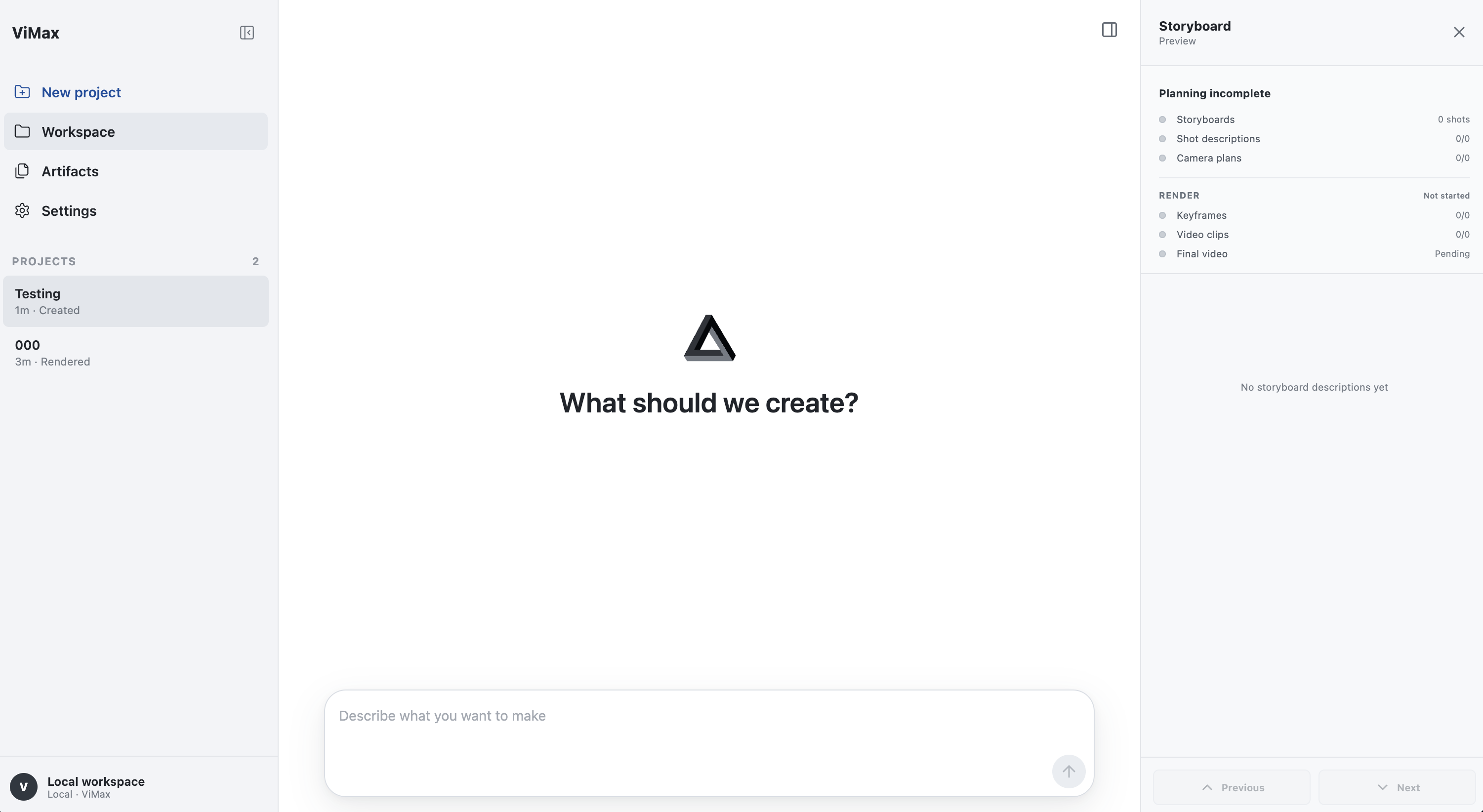
The Web UI brings agent conversation, project artifacts, storyboard previews, and render progress into one visual workspace.
---
The Challenges:
ViMAX: eliminates these production bottlenecks by automating the entire video creation pipeline from narrative input to final video output.
---
| 🧠 Effortless Production | 🚀 Complete Creative Freedom | 🔊 Audio and Video Binding | 🎨 Professional Quality | 🤩 Interactive Video |:---:|:---:|:---:|:---:|:---:| | One-Prompt to Finished Video | From Any Narrative to Reality | Synchronized Storytelling | Movie-Grade Output | Make Your Own Cameo Video | Skip the technical complexity—just describe your vision and let ViMax handle script generation, storyboarding, shot design, reference management, and consistency validation | No creative limits—whether it's a trailer, short story, novel chapter, or original concept, ViMax intelligently structures narratives and designs cinematography to bring any idea to life | Seamlessly integrate character voice, and sound effects with visual content to create immersive experiences where audio and video work in perfect harmony | Automated quality control ensures character consistency, proper scene composition, and professional visual standards across every frame of your video | Interact in your own short stories by uploading your photo—ViMax intelligently integrates you as a character with consistent appearance and natural interactions throughout the entire video
ViMax now also includes an Agents Loop + TUI workflow for interactive planning, revision, rendering control, session reuse, and context compaction while preserving the original direct pipeline entrypoints.
---
OS: Linux, Windows
git clone https://github.com/HKUDS/ViMax.git
cd ViMax
uv sync
ViMax also provides a minimal TUI for interactive agent-based video creation. Create a private local configuration from the tracked example first:
cp configs/agent.example.yaml configs/agent.local.yaml
Then configure the model and API key information in configs/agent.local.yaml, including the LLM, image generator, and video generator, as shown below.
llm:
  model_provider: openai
  model: <YOUR_LLM_MODEL>
  base_url: <YOUR_LLM_BASE_URL>
  api_key: <YOUR_API_KEY>
image:
  model: <YOUR_IMAGE_MODEL>
  base_url: <YOUR_IMAGE_BASE_URL>
  api_key: <YOUR_API_KEY>
video:
  model: <YOUR_VIDEO_MODEL>
  base_url: <YOUR_VIDEO_BASE_URL>
  api_key: <YOUR_API_KEY>
Then, start the TUI from the ViMax root directory:
vimax tui
Start a new session or resume an existing one:
vimax tui new
vimax tui resume
vimax tui resume <session_id>
You can also keep configs/agent.local.yaml empty and provide the same values through environment variables, such as VIMAX_LLM_API_KEY, VIMAX_IMAGE_API_KEY, and VIMAX_VIDEO_API_KEY.
The Web UI uses the same ViMax agent runtime, sessions, tools, and private configs/agent.local.yaml configuration as the TUI. Node.js 18 or newer is required.
From the ViMax repository root, install the frontend dependencies once and start the local server:
cd web
npm install
npm run dev
Open http://127.0.0.1:4173 in your browser. The Web UI supports named projects, agent conversations, slash commands, artifact and render inspection, storyboard previews, file uploads, and provider settings.
The server binds to 127.0.0.1 by default. When ViMax runs on a remote machine, forward the port from your local computer:
ssh -N -L 4173:127.0.0.1:4173 @
Use VIMAX_WEB_PORT when another local port is required:
VIMAX_WEB_PORT=4174 npm run dev
main_idea2video.py is used to convert your ideas into videos. You need to configure the model and API key information in the configs/idea2video.yaml file, including three parts—the chat model, the image generator, and the video generator, as shown below
chat_model:
  init_args:
    model: google/gemini-2.5-flash-lite-preview-09-2025
    model_provider: openai
    api_key: <YOUR_API_KEY>
    base_url: https://openrouter.ai/api/v1
image_generator:
  class_path: tools.ImageGeneratorNanobananaGoogleAPI
  init_args:
    api_key: <YOUR_API_KEY>
video_generator:
  class_path: tools.VideoGeneratorVeoGoogleAPI
  init_args:
    api_key: <YOUR_API_KEY>
working_dir: .working_dir/idea2video
Then, provide a simple yet thoughtful idea and the corresponding creative requirements in main_idea2video.py.
idea = \
"""
If a cat and a dog are best friends, what would happen when they meet a new cat?
"""
user_requirement = \
"""
For children, do not exceed 3 scenes.
"""
style = "Cartoon"
main_script2video.py generates a video based on a specific script. You similarly need to set up the API configuration in configs/script2video.yaml file. Then, provide a scene script and the corresponding creative requirements in main_script2video.py, as shown below.
script = \
"""
EXT. SCHOOL GYM - DAY
A group of students are practicing basketball in the gym. The gym is large and open, with a basketball hoop at one end and a large crowd of spectators at the other end. John (18, male, tall, athletic) is the star player, and he is practicing his dribble and shot. Jane (17, female, short, athletic) is the assistant coach, and she is helping John with his practice. The other students are watching the practice and cheering for John.
John: (dribbling the ball) I'm going to score a basket!
Jane: (smiling) Good job, John!
John: (shooting the ball) Yes!
...
"""
user_requirement = \
"""
Fast-paced with no more than 20 shots.
"""
style = "Animate Style"
 →
→ →
→ →
→ →
→ →
→