







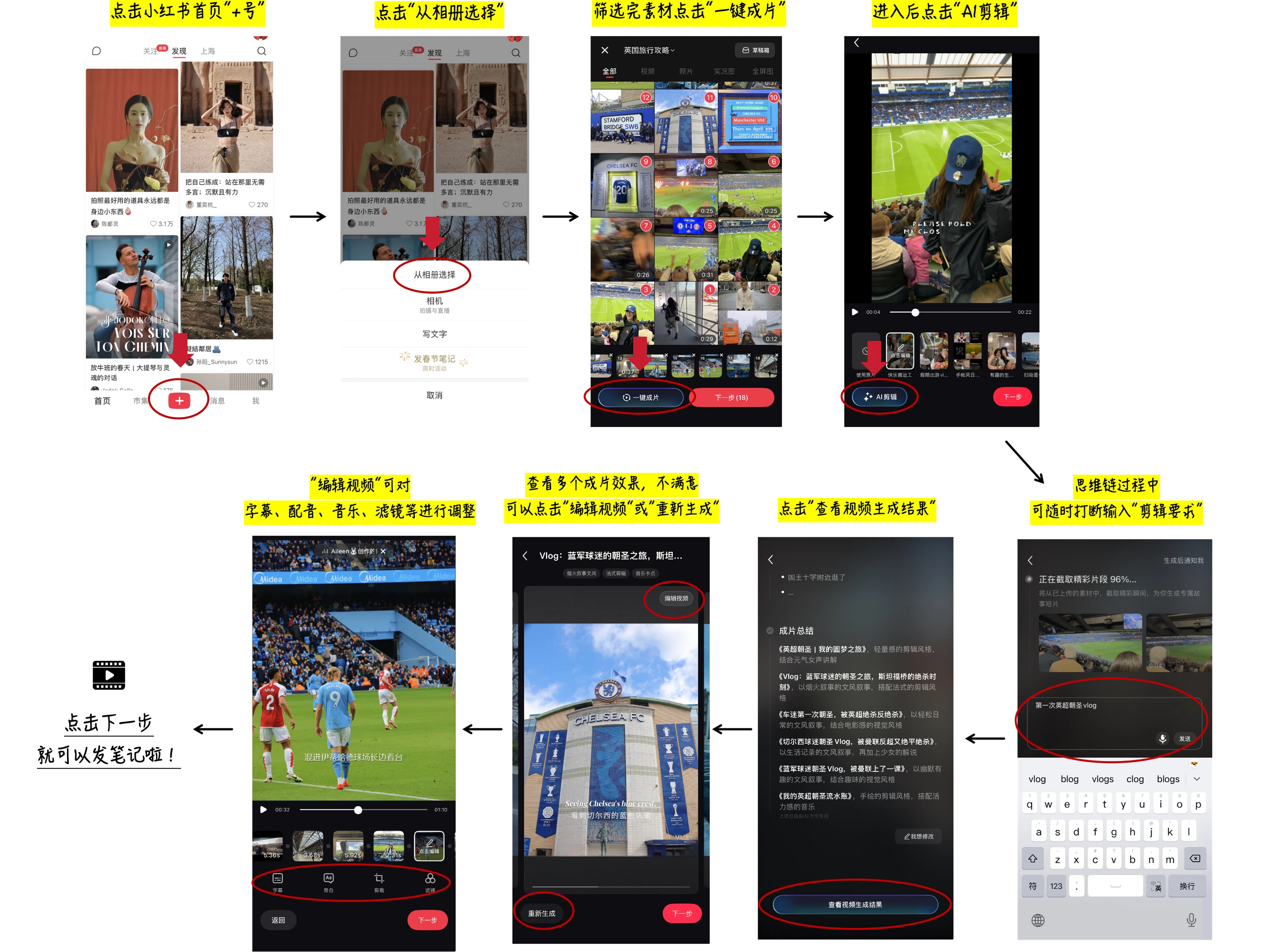
1
 →
→
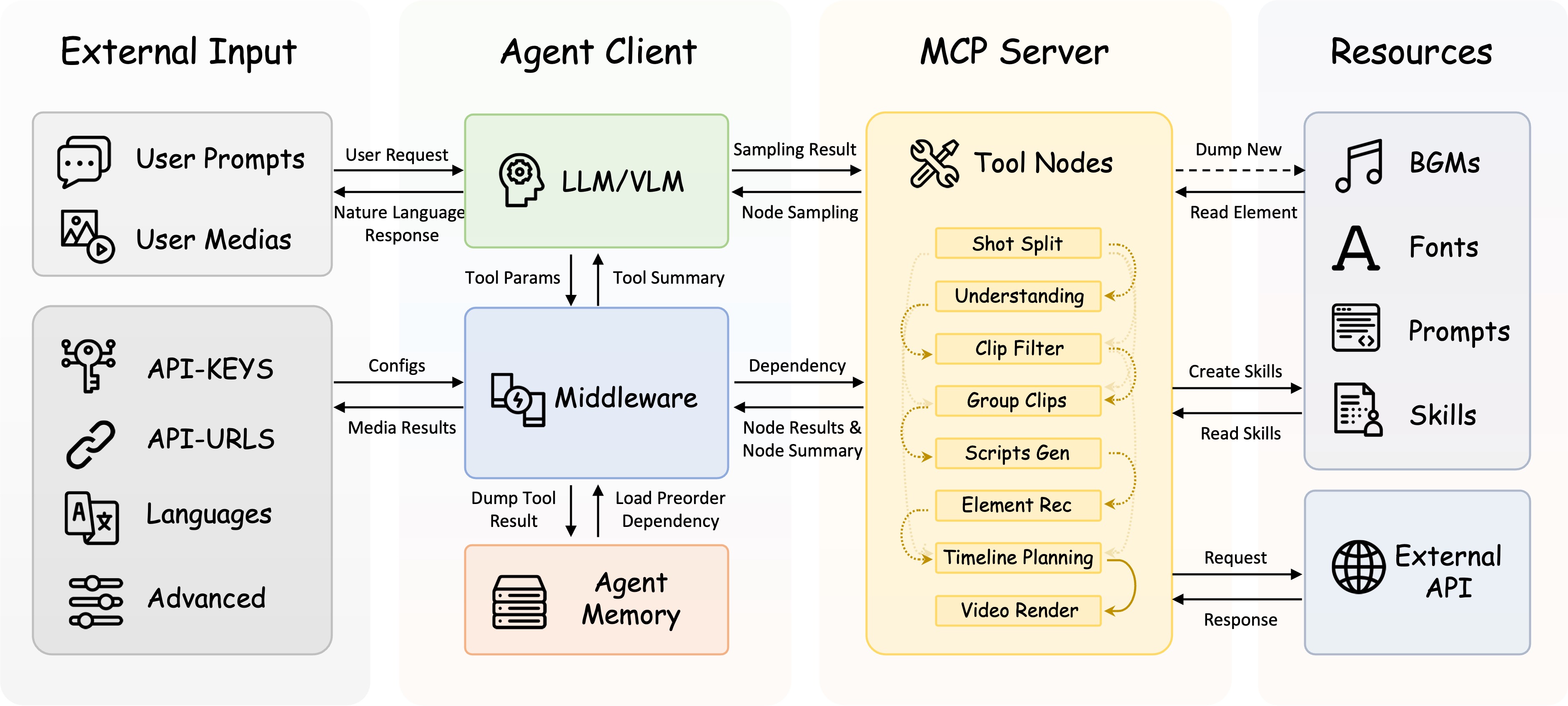
FireRed-OpenStoryline is an AI video editing agent that transforms manual editing into intention-driven directing through natural language interaction, LLM-powered planning, and precise tool orchestration. It facilitates transparent, human-in-the-loop creation with reusable Style Skills for consistent, professional storytelling.
FireRed-OpenStoryline turns complex video creation into natural, intuitive conversations. Designed with both accessibility and enterprise-grade reliability in mind, FireRed-OpenStoryline makes video creation easy and friendly to beginners and creative enthusiasts alike.
Deriving from the saying "A single spark can start a prairie fire", the name FireRed represents our vision: to spread our SOTA capabilities—honed in real-world scenarios—like sparks across the wilderness, igniting the imagination of developers worldwide to reshape the future of AI together.
openstoryline-install and openstoryline-use — covering the initial installation/first-run workflow and the actual usage workflow, respectively. Also added Skill usage instructions for Claude Code, making it easier for Claude Code to install and invoke the project in accordance with the repository guidelines.⚠️ Note: AI transitions rely on third-party AIGC video generation services, and the cost is relatively high. Due to variations in source material quality, prompts, and model performance, the generated results are somewhat unpredictable. It is recommended to enable this feature only when needed.
| Zhongcao Style | Humorous Style | Product Picks | Artistic Style |
| Unboxing | Talking Pet | Travel Vlog | Year-in-Review |
🎨 Effects Note: Due to licensing restrictions on open-source assets, the elements (fonts/music) in the first row represent only basic effects. We highly recommend following the Custom Asset Library Tutorial to unlock commercial-grade fonts, music, and VFX for significantly better video quality.
⚠️ Quality Note: To save space in the README, the demo videos are heavily compressed. The actual output retains the original resolution by default and supports custom dimensions.
In the Demo: The first row shows default open-source assets (Restricted Mode); the second row shows Xiaohongshu App "AI Clip" asset library effects. 👉 Click to view tutorial
⚖️ Disclaimer: User footage and brand logos shown in the demos are for technical demonstration purposes only. Ownership belongs to the original creators. Please contact us for copyright concerns.
FireRed-OpenStoryline supports usage through Agent Skills. We provide two Skills:
openstoryline-install: for installation, configuration, and first-run verification.openstoryline-use: for starting the service and running the actual video editing workflow.Just tell OpenClaw: “I want to try OpenStoryline. Help me install the required Skills,” and it will automatically trigger the installation. If the installation runs into problems, use the following commands to install them manually:
openclaw skills install openstoryline-install
openclaw skills install openstoryline-use
If your current OpenClaw version does not support openclaw skills install, or if installation still fails, you can use ClawHub instead:
npx clawhub install openstoryline-install
npx clawhub install openstoryline-use
Once installed, you only need to send your media assets to OpenClaw, and it can help you complete the entire process from installing FireRed-OpenStoryline to generating the final video.
This repository comes with built-in Claude Code Skills. If you start Claude Code from the root directory of this repository, you can use the project-level Skills included in the repo directly. Claude Code can then help you install and use FireRed-OpenStoryline.
/openstoryline-install
/openstoryline-use
If you want to install these two Skills into your own global Claude Code configuration, run:
mkdir -p ~/.claude/skills
cp -R .claude/skills/openstoryline-install ~/.claude/skills/
cp -R .claude/skills/openstoryline-use ~/.claude/skills/
These Skills are based on an open Agent Skills format, so in theory they can also be installed into other compatible agents. For example, you can install them into Codex via the Skills CLI:
npx skills add FireRedTeam/FireRed-OpenStoryline --skill openstoryline-install --agent codex
npx skills add FireRedTeam/FireRed-OpenStoryline --skill openstoryline-use --agent codex
Or use the commands below with the --global flag to install these Skills into the user-level directory so they are available across projects:
npx skills add FireRedTeam/FireRed-OpenStoryline --skill openstoryline-install --global
npx skills add FireRedTeam/FireRed-OpenStoryline --skill openstoryline-use --global
# If git is not installed, refer to the official website for installation: https://git-scm.com/install/
Or manually download the code
git clone https://github.com/FireRedTeam/FireRed-OpenStoryline.git
cd FireRed-OpenStoryline
Install Conda according to the official guide (Miniforge is recommended, it is suggested to check the option to automatically configure environment variables during installation): https://docs.conda.io/projects/conda/en/latest/user-guide/install/index.html
# Recommended python>=3.11
conda create -n storyline python=3.11
conda activate storyline
sh build_env.sh
    # MacOS: If you haven't installed Homebrew yet, please install it first: https://brew.sh/
    brew install wget

    # Ubuntu/Debian
    sudo apt-get install wget

    # CentOS
    sudo yum install wget
    chmod +x download.sh
    ./download.sh
pip install -r requirements.txt
storyline.local_asr, make sure torchaudio is installed in the same environment.
resource in the project root directory..storyline directory.resource directory. pip install -r requirements.txt
storyline.local_asr, make sure torchaudio is installed in the same environment.
Note: Before starting, you need to configure the API-Key in config.toml first. For details, please refer to the documentation API-Key Configuration
PYTHONPATH=src python -m open_storyline.mcp.server
$env:PYTHONPATH="src"; python -m open_storyline.mcp.server
python cli.py
uvicorn agent_fastapi:app --host 127.0.0.1 --port 8005
# Pull image from Docker Hub official repository
Recommended for users outside China
docker pull openstoryline/openstoryline:v1.0.1
Pull image from Alibaba Cloud Container Registry
Recommended for users in China (faster and more stable)
docker pull crpi-6knxem4w8ggpdnsn.cn-shanghai.personal.cr.aliyuncs.com/openstoryline/openstoryline:v1.0.1
docker run \
  -v $(pwd)/config.toml:/app/config.toml \
  -v $(pwd)/outputs:/app/outputs \
  -v $(pwd)/run.sh:/app/run.sh \
  -p 7860:7860 \
  openstoryline/openstoryline:v1.0.1
FireRed-OpenStoryline/
├── 🎯 src/open_storyline/           Core application
│   ├── mcp/                         🔌 Model Context Protocol
│   ├── nodes/                       🎬 Video processing nodes
│   ├── skills/                      🛠️ Agent skills library
│   ├── storage/                     💾 Agent Memory
│   ├── utils/                       🧰 Helper utilities
│   ├── agent.py                     🤖 Build Agent
│   └── config.py                    ⚙️ Configuration management
├── 📚 docs/                         Documentation
├── 🐳 Dockerfile                    Docker Configuration
├── 💬 prompts/                      LLM prompt templates
├── 🎨 resource/                     Static resources
│   ├── bgms/                        Background music library
│   ├── fonts/                       Font files
│   ├── script_templates/            Video script templates
│   └── unicode_emojis.json          Emoji list
├── 🔧 scripts/                      Utility scripts
├── 🌐 web/                          Web interface
├── 🚀 agent_fastapi.py              FastAPI server
├── 🖥️ cli.py                        Command-line interface
├── ⚙️ config.toml                   Main configuration file
├── 🚀 build_env.sh                  Environment Build Script
├── 📥 download.sh                   Resource downloader
├── 📦 requirements.txt              Runtime dependencies
└── ▶️ run.sh                        Launch script
This project is built upon the following excellent open-source projects:
This project is licensed under the Apache License 2.0 - see the LICENSE file for details.
→ →
→ →
→ →
→ →
→ →
→