1
 →
→
Video players (IJKplayer, ExoPlayer, MediaPlayer), HTTPS, 16k page size, danmaku (bullet chat) support, external subtitles, support for filters, watermarks, and GIF screenshots, pre-roll and mid-roll ads, multiple simultaneous playback, basic seeking/dragging, volume and brightness adjustment, play-while-cache support

## If cloning is too slow or images are not visible, you can try to synchronize from the following addresses
- GitCode https://gitcode.com/ZuoYueLiang/GSYVideoPlayer
- Gitee:https://gitee.com/CarGuo/GSYVideoPlayer
Type | Function
-------------|-------------------------------------------------------------------------------------------------------------------------------------------------
Cache | Play while caching, using AndroidVideoCache; Media3(ExoPlayer) uses SimpleCache.
Protocols | h263\4\5, Https, concat, rtsp, hls, rtmp, crypto, mpeg, etc. (ijk mode format support)
Filters | Simple filters (mosaic, black and white, color filter, Gaussian, blur, etc. more than 20 kinds), animation, (watermark, multi-screen playback, etc.).
Frame images | Video first frame, video frame screenshots, composed player screenshots including UI, and video to gif function.
Playback | List playback, continuous list playback, gravity rotation and manual rotation, video's own rotation attribute, fast and slow playback, network video loading speed.
Screen | Adjust display ratio: default, 16:9, 4:3, fill; rotate screen angle during playback (0,90,180,270); mirror rotation.
Kernel | IJKPlayer, Media3(EXOPlayer), MediaPlayer, AliPlayer switching, custom kernel
Layout | Full screen and non-full screen two sets of layout switching, pure playback support without any operation controls, barrage function, inherited custom any layout.
Playback | Singleton playback, multiple simultaneous playback, video list sliding automatic playback, seamless playback of list switching detail pages.
Window | Small window, small window playback in multiple windows (including desktop).
Ads | Opening ads, skip ad support, interstitial ad function.
Subtitles | Unified external subtitle overlay supports SRT/WebVTT across IJK, Media3(EXOPlayer), and MediaPlayer; Media3 embedded cues can bridge to the same UI.
Dash | Media3(exo2) mode supports dash; the demo supports HLS master / DASH MPD adaptive quality track switching.
Stream | Supports metadata playback
Adapt 16k | ex_so adapts to 16K Page Size
openssl | Currently ex_so's arm64/x86_64 uses openssl 1.1.1w
FFmpeg | Currently ex_so's arm64/x86_64 uses FFmpeg 4.3
FFmpeg | Currently ex_so's arm64/x86_64 supports G711a(pcm_alaw)
Cast | Optional gsyvideoplayer-cast DLNA/UPnP module built on jUPnP 3.0.3; the core keeps only the protocol-neutral CastCapability / CastProvider / CastSession SPI and does not pull Jetty. Details.
More | No black screen when pausing front and back switching; multi-URL quality switching; Exo HLS/DASH adaptive quality; seamless switching support; keep-last-frame demo; WebVTT progress bar preview.
Customization | Customizable rendering layer, custom management layer, custom playback layer (control layer), custom cache layer.




[]()



[]()


| Official Account | Juejin | Zhihu | CSDN | Jianshu |---------|-------------------------------------------------------------|-------------------------------------------|-----------------------------------------|----------------------------------------------| | GSYTech | Click me | Click me | Click me | Click me

There are currently three hosting methods:
Since jitpack keeps losing packages, it has been migrated to MavenCentral. The usage is as follows:
allprojects {
    repositories {
        ///...
        mavenCentral()
        maven { url "https://maven.aliyun.com/repository/public" }
    }
}
You can choose one of the following three and add it to the build.gradle under the module.
 //Complete version introduction
implementation 'io.github.carguo:gsyvideoplayer:13.2.1'
//Whether AliPlayer mode is needed
implementation 'io.github.carguo:gsyvideoplayer-aliplay:13.2.1'
//Whether DLNA/UPnP casting is needed (optional, minSdk 26)
implementation 'io.github.carguo:gsyvideoplayer-cast:13.2.1'
 implementation 'io.github.carguo:gsyvideoplayer-java:13.2.1'
//Whether ExoPlayer mode is needed
 implementation 'io.github.carguo:gsyvideoplayer-exo2:13.2.1'
//Optional direct RTMP module; exo2 already exposes it transitively
 implementation 'io.github.carguo:gsyvideoplayer-rtmp:13.2.1'
//Optional DLNA/UPnP cast implementation (minSdk 26); the default player does not include Jetty
 implementation 'io.github.carguo:gsyvideoplayer-cast:13.2.1'
//Whether AliPlayer mode is needed
 implementation 'io.github.carguo:gsyvideoplayer-aliplay:13.2.1'
//so of ijk mode according to your needs
 implementation 'io.github.carguo:gsyvideoplayer-arm64:13.2.1'
 implementation 'io.github.carguo:gsyvideoplayer-armv7a:13.2.1'
 implementation 'io.github.carguo:gsyvideoplayer-armv5:13.2.1'
 implementation 'io.github.carguo:gsyvideoplayer-x86:13.2.1'
 implementation 'io.github.carguo:gsyvideoplayer-x64:13.2.1'
A and B normal versions support 263/264/265, etc. For mpeg encoding, there will be sound but no picture. The so introduced by C supports mpeg encoding and other supplementary protocols, but the so package is relatively larger.
 implementation 'io.github.carguo:gsyvideoplayer-java:13.2.1'
//Whether ExoPlayer mode is needed
 implementation 'io.github.carguo:gsyvideoplayer-exo2:13.2.1'
//Whether AliPlayer mode is needed
 implementation 'io.github.carguo:gsyvideoplayer-aliplay:13.2.1'
//More ijk encoding support
 implementation 'io.github.carguo:gsyvideoplayer-ex_so:13.2.1'
The gsyvideoplayer-compose module is published with v13.1.0. It can be consumed from Maven Central / GitHub Packages like the other modules, or by depending on the source module directly with implementation project(":gsyVideoPlayer-compose") when working inside this repository.
> 🛠 Toolchain note: the Compose module is verified on JDK 21 in CI (.github/workflows/*.yml—actions/setup-javajava-version: 21) and JDK 17 locally (the module pinssourceCompatibility / targetCompatibility / jvmTarget = 17in gsyVideoPlayer-compose/build.gradle). Both are fine; just make sure your local JDK is ≥ 17 so Kotlin 2.0.21 + AGP 8.6.1 can build.
The new gsyvideoplayer-compose module exposes Compose entries on top of the existing kernels and UI without touching any legacy code:
GSYVideoPlayerView { ... } embeds StandardGSYVideoPlayer into a Compose screen, with automatic Lifecycle bridge and release on dispose. An optional setUpKey: Any? parameter lets you trigger setUp again only when the data identity changes (idempotent).GSYComposeHostPlayer + GSYPlayerController exposes a GSYPlayerSnapshot state stream plus an events: SharedFlow of one-shot edge events (Prepared / AutoComplete / Error), so the control UI can be drawn entirely in Compose while the rendering pipeline still uses the GSY multi-kernel core. The legacy setOnError / setOnComplete / setOnPrepared setters are still supported but @Deprecated in favour of the Flow API.// Maven Central:
implementation 'io.github.carguo:gsyvideoplayer-compose:13.2.1'
// Source dependency for local development:
implementation project(':gsyVideoPlayer-compose')
// compose-bom is api-exposed from the module; consumers still manage androidx.compose.* per their own project setup.
See doc/COMPOSE_USE.md. The sample app provides a Compose Demo entry with 24 runnable Compose Activities — covering Wrapper basics, Native detail/list/multi-window/auto-play/seamless-switch, plus P5 differentiating capabilities (filter, cache/download, ad pre-roll, subtitle, custom danmaku, EXO multi-source, parallel multi-window) and P5-2 modern app patterns (vertical short video, floating window, multi-type list, web mixed layout, audio-only, URL/local file, MediaCodec hardware switch, themed custom controls). DemoSamples.kt is a shared data object of test URLs, not a runnable Activity. Outstanding gaps and the rolling roadmap are tracked in doc/COMPOSE_BACKLOG.md.
Since Jitpack often has the problem of random loss of historical packages, a new Github Package dependency method is added. The usage is as follows:
However, accessing github package requires a token to access, which is more troublesome, but it is stable.
allprojects {
    repositories {
		//...
        maven {
            url 'https://maven.pkg.github.com/CarGuo/GSYVideoPlayer'
// You can also use your own GitHub account and token
            // For convenience, I have provided a token for an infrequently used account here
            credentials {
                // your github name
                username = 'carsmallguo'
                // your github generate new token
                password = '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'
            }
        }
        maven {
            url "https://maven.aliyun.com/repository/public"
        }
        mavenCentral()
}
}
In theory, it is the avatar in the upper right corner - Settings - Developer Settings - Personal access tokens - tokens (classic) -
Generate new token (classic) - read:packages
Remember to choose permanent for the expiration time
Tip: this repository's root build.gradle already supports reading the GitHub Packages credentials from a Gradle property or environment variable, so you don't have to hard-code your own token in the source tree:
>> # ~/.gradle/gradle.properties (recommended for local builds)
githubReadUser=
githubReadToken=
> Or in CI:
>> export GITHUB_READ_USER=
export GITHUB_READ_TOKEN=
> The hard-coded carsmallguo / ghp_... pair is only kept as a fallback so first-time clones still build out of the box; it may be revoked at any time, so prefer providing your own.
You can choose one of the following three and add it to the build.gradle under the module.
 //Complete version introduction
 implementation 'com.shuyu:gsyvideoplayer:13.2.1'
//Whether AliPlayer mode is needed
 implementation 'com.shuyu:gsyvideoplayer-aliplay:13.2.1'
//Whether DLNA/UPnP casting is needed (optional, minSdk 26)
 implementation 'com.shuyu:gsyvideoplayer-cast:13.2.1'
 implementation 'com.shuyu:gsyvideoplayer-java:13.2.1'
//Whether ExoPlayer mode is needed
 implementation 'com.shuyu:gsyvideoplayer-exo2:13.2.1'
//Optional direct RTMP module; exo2 already exposes it transitively
 implementation 'com.shuyu:gsyvideoplayer-rtmp:13.2.1'
//Optional DLNA/UPnP cast implementation (minSdk 26); the default player does not include Jetty
 implementation 'com.shuyu:gsyvideoplayer-cast:13.2.1'
//Whether AliPlayer mode is needed
 implementation 'com.shuyu:gsyvideoplayer-aliplay:13.2.1'
//so of ijk mode according to your needs
 implementation 'com.shuyu:gsyvideoplayer-armv5:13.2.1'
 implementation 'com.shuyu:gsyvideoplayer-armv7a:13.2.1'
 implementation 'com.shuyu:gsyvideoplayer-arm64:13.2.1'
 implementation 'com.shuyu:gsyvideoplayer-x86:13.2.1'
 implementation 'com.shuyu:gsyvideoplayer-x64:13.2.1'
A and B normal versions support 263/264/265, etc. For mpeg encoding, there will be sound but no picture. The so introduced by C supports mpeg encoding and other supplementary protocols, but the so package is relatively larger.
 implementation 'com.shuyu:gsyvideoplayer-java:13.2.1'
//Whether ExoPlayer mode is needed
 implementation 'com.shuyu:gsyvideoplayer-exo2:13.2.1'
//Whether AliPlayer mode is needed
 implementation 'com.shuyu:gsyvideoplayer-aliplay:13.2.1'
//More ijk encoding support
 implementation 'com.shuyu:gsyvideoplayer-ex_so:13.2.1'
implementation 'com.shuyu:gsyvideoplayer-compose:13.2.1'
Historical packages may have random packet loss, and it is not easy to supplement, see #4144:
allprojects {
    repositories {
		//...
        maven { url 'https://jitpack.io' }
        maven { url "https://maven.aliyun.com/repository/public" }
        mavenCentral()
    }
}
You can choose one of the following three and add it to the build.gradle under the module.
 //Complete version introduction
implementation 'com.github.CarGuo.GSYVideoPlayer:gsyvideoplayer:v13.2.1'
//Whether AliPlayer mode is needed
 implementation 'com.github.CarGuo.GSYVideoPlayer:gsyvideoplayer-aliplay:v13.2.1'
//Whether DLNA/UPnP casting is needed (optional, minSdk 26)
 implementation 'com.github.CarGuo.GSYVideoPlayer:gsyvideoplayer-cast:v13.2.1'
 implementation 'com.github.CarGuo.GSYVideoPlayer:gsyvideoplayer-java:v13.2.1'
//Whether ExoPlayer mode is needed
 implementation 'com.github.CarGuo.GSYVideoPlayer:gsyvideoplayer-exo2:v13.2.1'
//Optional DLNA/UPnP cast implementation (minSdk 26)
 implementation 'com.github.CarGuo.GSYVideoPlayer:gsyvideoplayer-cast:v13.2.1'
//Whether AliPlayer mode is needed
 implementation 'com.github.CarGuo.GSYVideoPlayer:gsyvideoplayer-aliplay:v13.2.1'
//so of ijk mode according to your needs
 implementation 'com.github.CarGuo.GSYVideoPlayer:gsyvideoplayer-arm64:v13.2.1'
 implementation 'com.github.CarGuo.GSYVideoPlayer:gsyvideoplayer-armv7a:v13.2.1'
 implementation 'com.github.CarGuo.GSYVideoPlayer:gsyvideoplayer-armv5:v13.2.1'
 implementation 'com.github.CarGuo.GSYVideoPlayer:gsyvideoplayer-x86:v13.2.1'
 implementation 'com.github.CarGuo.GSYVideoPlayer:gsyvideoplayer-x64:v13.2.1'
A and B normal versions support 263/264/265, etc. For mpeg encoding, there will be sound but no picture. The so introduced by C supports mpeg encoding and other supplementary protocols, but the so package is relatively larger.
 implementation 'com.github.CarGuo.GSYVideoPlayer:gsyvideoplayer-java:v13.2.1'
//Whether ExoPlayer mode is needed
 implementation 'com.github.CarGuo.GSYVideoPlayer:gsyvideoplayer-exo2:v13.2.1'
//Whether AliPlayer mode is needed
 implementation 'com.github.CarGuo.GSYVideoPlayer:gsyvideoplayer-aliplay:v13.2.1'
//More ijk encoding support
 implementation 'com.github.CarGuo.GSYVideoPlayer:gsyvideoplayer-ex_so:v13.2.1'
----------------------------------------------------------
//EXOPlayer kernel, supports more formats
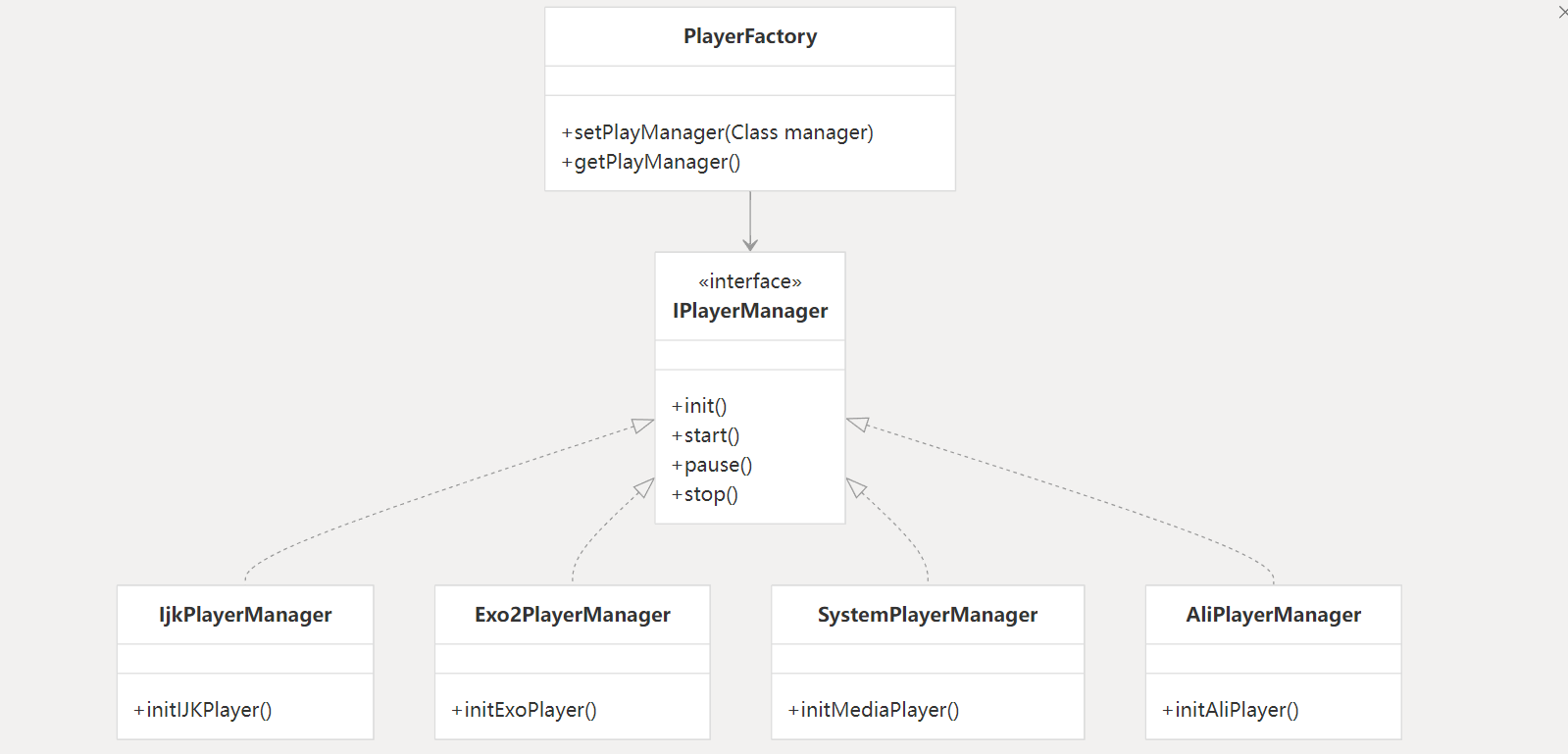
PlayerFactory.setPlayManager(Exo2PlayerManager.class);
//System kernel mode
PlayerFactory.setPlayManager(SystemPlayerManager.class);
//ijk kernel, default mode
PlayerFactory.setPlayManager(IjkPlayerManager.class);
//aliplay kernel, default mode
PlayerFactory.setPlayManager(AliPlayerManager.class);
//exo cache mode, supports m3u8, only supports exo
//Set before Exo cache is created. Default is 512 MB.
ExoSourceManager.setCacheMaxSize(1024L 1024L 1024L);
CacheFactory.setCacheManager(ExoPlayerCacheManager.class);
//Proxy cache mode, supports all modes, does not support m3u8, etc., default
CacheFactory.setCacheManager(ProxyCacheManager.class);
//Switch rendering mode
GSYVideoType.setShowType(GSYVideoType.SCREEN_MATCH_FULL);
//Default display ratio
GSYVideoType.SCREEN_TYPE_DEFAULT = 0;
//16:9
GSYVideoType.SCREEN_TYPE_16_9 = 1;
//4:3
GSYVideoType.SCREEN_TYPE_4_3 = 2;
//Full screen cropping display, for normal display CoverImageView it is recommended to use FrameLayout as the parent layout
GSYVideoType.SCREEN_TYPE_FULL = 4;
//Full screen stretching display, when using this attribute, it is recommended to use FrameLayout for surface_container
GSYVideoType.SCREEN_MATCH_FULL = -4;
/***
- Custom display ratio under SCREEN_TYPE_CUSTOM
- @param screenScaleRatio Aspect ratio, such as 16:9
*/
public static void setScreenScaleRatio(float screenScaleRatio)
//Switch drawing mode
GSYVideoType.setRenderType(GSYVideoType.SUFRACE);
GSYVideoType.setRenderType(GSYVideoType.GLSURFACE);
GSYVideoType.setRenderType(GSYVideoType.TEXTURE);
//ijk close log
IjkPlayerManager.setLogLevel(IjkMediaPlayer.IJK_LOG_SILENT);
//exoplayer custom MediaSource
ExoSourceManager.setExoMediaSourceInterceptListener(new ExoMediaSourceInterceptListener() {
@Override
public MediaSource getMediaSource(String dataSource, boolean preview, boolean cacheEnable, boolean isLooping, File cacheDir) {
//Customizable MediaSource
return null;
}
});
174815284~~ , New group: 992451658 .
Document | Portal ---------------|---------------------------------------------------------------------------------------------------------------------------------------------------- Usage Instructions | --- Simple usage, quick start documentation Recommended Reading | --- Basic audio and video knowledge that mobile developers must know 1, --- Basic audio and video knowledge that mobile developers must know 2 Project Analysis Description | --- Project analysis description, including project architecture and analysis API Documentation Entrance | --- Usage instructions, API documentation - Entrance FAQ Entrance | --- FAQ - Entrance (most of the problems you encounter are solved here) Encoding Format | --- IJK so file configuration format description Compile Custom SO | --- IJKPlayer Compile Custom SO - Entrance Version Update Instructions | --- Version Update Instructions - Entrance compileSdk too high | --- #3514
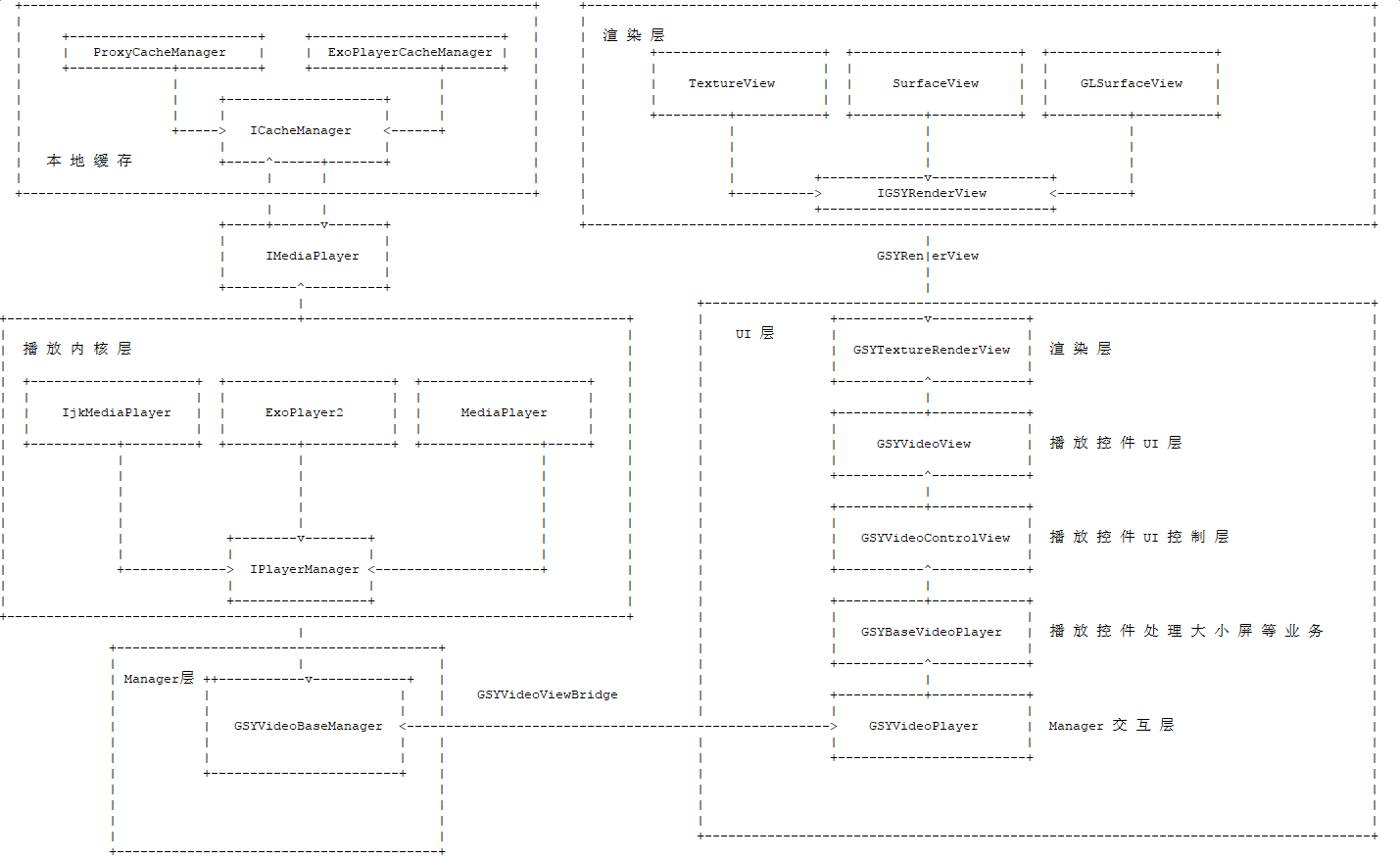
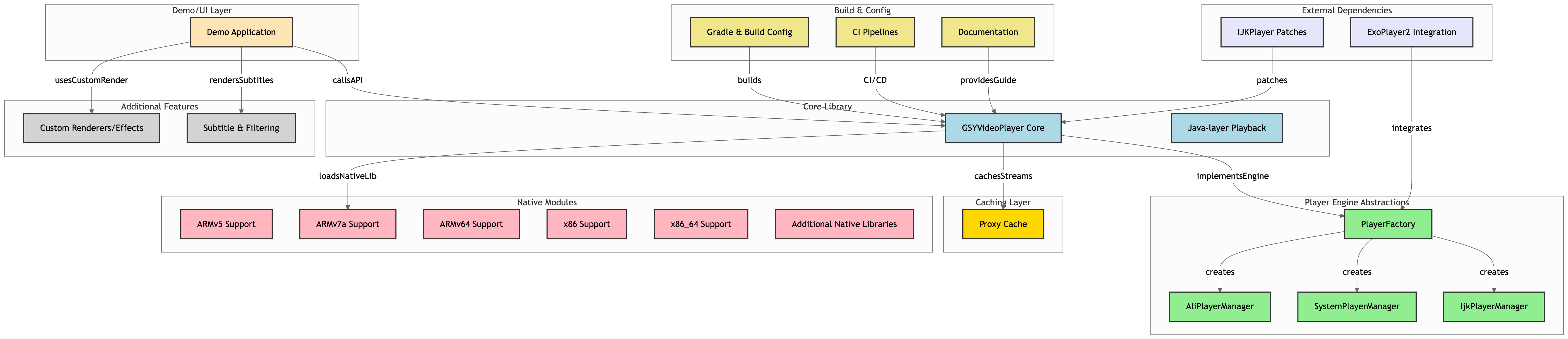
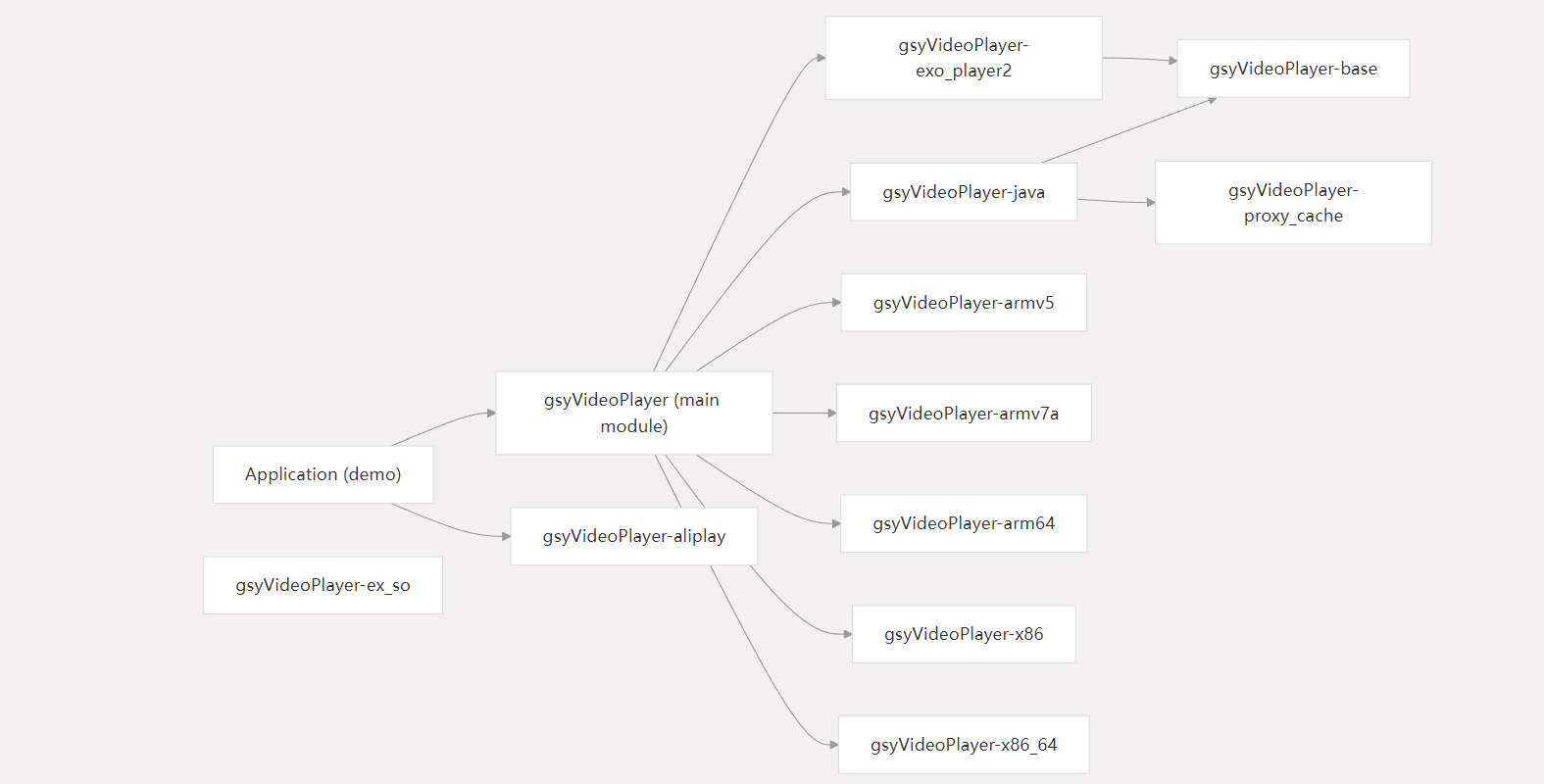
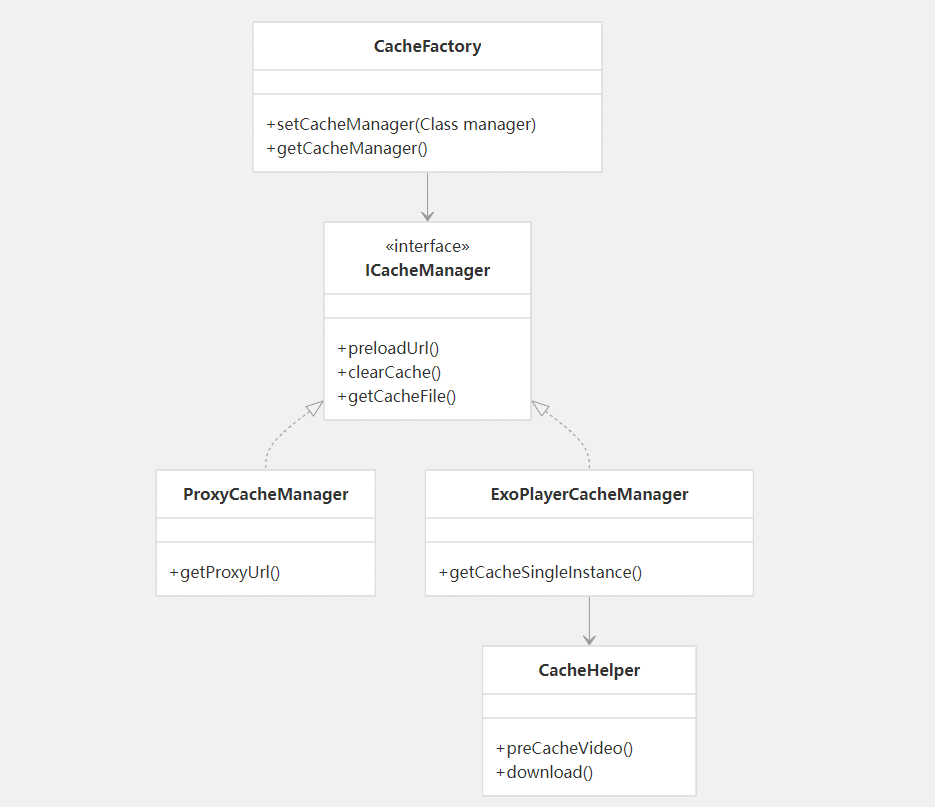
More visible: https://codewiki.google/github.com/carguo/gsyvide
→ →
→ →
→ →
→ →
→ →
→